Responsive Design is a game changer in our tech-savvy world, allowing websites to adapt seamlessly to various screen sizes and devices. With more users accessing the internet from smartphones and tablets than ever before, the importance of creating a fluid and engaging user experience cannot be overstated.
The shift towards mobile-first design is not just a trend but a necessity for businesses looking to connect with their audience effectively. Responsive Design helps ensure that all users, regardless of their device, have a pleasant browsing experience, ultimately leading to increased engagement and satisfaction.
The Importance of Responsive Design in Today’s Digital Landscape
Responsive design has become an essential component of modern web development, ensuring that websites provide an optimal viewing experience across a variety of devices, from desktops to mobile phones. As the digital landscape evolves, the significance of responsive design grows, particularly in enhancing user experience. This adaptability not only fosters greater accessibility and usability but also plays a crucial role in search engine optimization, as search engines favor mobile-friendly websites.
The impact of mobile usage on web design strategies is profound. As of 2022, mobile devices accounted for over 54% of global web traffic, indicating a clear shift in how users interact with online content. This shift has compelled businesses and designers to rethink their approaches, prioritizing mobile-first design principles that cater to the needs of users who increasingly rely on their smartphones and tablets for information and services. The traditional desktop-centric design is no longer sufficient; users expect seamless experiences irrespective of the device they are using.
An effective responsive design strategy involves creating flexible layouts that adjust smoothly to different screen sizes and orientations. This flexibility not only enhances user experience but also maximizes engagement and conversion rates. For instance, websites like Amazon and eBay have successfully implemented responsive designs, ensuring that users can browse, compare, and purchase items effortlessly on any device. These platforms demonstrate how responsive design can lead to higher user satisfaction and increased sales.
Another notable example is the website of the New York Times, which utilizes a responsive approach to deliver its content effectively across various devices. Whether accessed on a smartphone, tablet, or desktop, the layout adapts dynamically, ensuring that articles are easy to read and navigate. This fluidity not only enhances user engagement but also reinforces the brand’s commitment to providing high-quality journalism in an accessible format.
In summary, the importance of responsive design in today’s digital landscape cannot be overstated. With the increasing prevalence of mobile usage, businesses must prioritize responsive strategies in their web design to cater to a diverse audience, enhance user experience, and ultimately drive success in an increasingly competitive market.
Key Principles of Responsive Design That Every Developer Should Understand
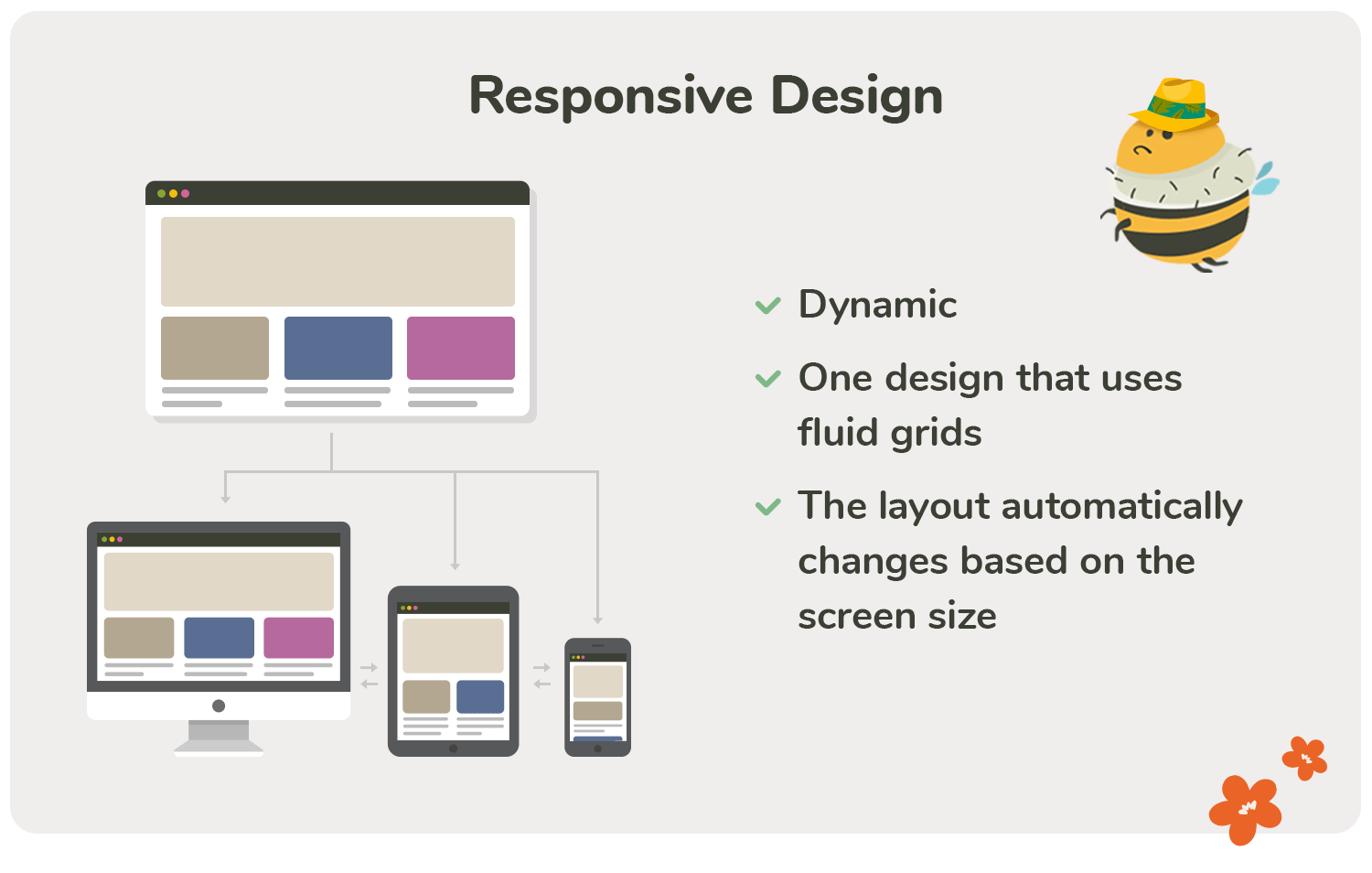
Responsive design is a crucial aspect of modern web development, ensuring that websites provide an optimal viewing experience across a wide range of devices. This approach not only enhances usability but also impacts and overall user satisfaction. Understanding the foundational principles that guide responsive design practices is essential for developers who aim to create adaptive and fluid interfaces that cater to diverse screen sizes and resolutions.
Fluid Grids and Seamless User Experience
One of the core principles of responsive web design is the use of fluid grids. Fluid grids utilize a flexible layout that adapts to the size of the user’s screen, allowing for a seamless experience regardless of device or resolution. Unlike fixed grids, which rely on specific pixel widths, fluid grids use relative units like percentages, ensuring that elements resize dynamically based on the viewport. This adaptability greatly improves usability, as it eliminates the need for horizontal scrolling and ensures that content remains accessible and aesthetically pleasing on all devices.
The implementation of fluid grids brings several advantages to the user experience:
- Dynamic Resizing: Content automatically adjusts to fill the available space, ensuring that users have a consistent viewing experience, whether on a smartphone, tablet, or desktop.
- Improved Readability: Text and images scale proportionally, making it easier for users to read and engage with content without zooming in or out.
- Responsive Navigation: Menus and buttons resize and rearrange according to screen size, facilitating intuitive navigation that enhances user interaction.
Fluid grids also contribute to faster load times. By optimizing the layout for various devices, developers can ensure that resources are loaded efficiently. For instance, images can be set to scale proportionally, meaning that smaller devices will download lower-resolution images, reducing bandwidth usage and improving performance.
Flexible Images and Media Queries
In addition to fluid grids, the effective use of flexible images and media queries plays a significant role in responsive design. Flexible images are designed to resize within their containing elements, maintaining visual integrity across different screen sizes. This can be achieved by setting the CSS property max-width to 100%, which allows images to scale down while preserving their aspect ratio.
Media queries further enhance the responsiveness of a website by applying different styles depending on the device’s characteristics. Developers can define breakpoints based on screen width, height, or orientation, allowing for tailored designs that meet specific needs. For example, a media query might adjust font sizes and padding for mobile devices, ensuring that the content is not only visually appealing but also ergonomically friendly.
“Responsive design is not just about making a website look good; it’s about creating a seamless experience that adapts to the user’s needs.”
In practice, a developer might implement a set of media queries to serve different styles for devices ranging from small smartphones to large desktop monitors. This multifaceted approach assures that every user receives an optimized experience tailored to their device, improving engagement and satisfaction.
Overall, grasping these key principles of responsive design—fluid grids, flexible images, and media queries—is essential for developers. By adopting these practices, they can create websites that not only look great but function seamlessly across a variety of devices, ultimately leading to a better user experience and higher retention rates.
Common Challenges Faced While Implementing Responsive Design
In the world of web development, responsive design has become essential for creating user-friendly websites that work seamlessly across various devices. However, the journey to implementing responsive design isn’t without its hurdles. Developers often encounter a range of challenges that can complicate the process, from technical issues to design limitations.
Obstacles During the Responsive Design Process
Implementing responsive design involves several challenges that can significantly impact the effectiveness of the final product. One major challenge is maintaining consistency across different screen sizes. Designers must ensure that elements such as navigation menus, images, and text adapt gracefully to varying resolutions. This often requires extensive media queries and adjustments to CSS, which can be time-consuming.
Another common obstacle is performance optimization. As websites become more feature-rich and include numerous assets, they can suffer from slow loading times. Developers need to strike a balance between a visually appealing design and one that loads efficiently, which may involve optimizing images, utilizing lazy loading, and minimizing the use of heavy scripts.
Testing across various devices and browsers is crucial yet often overlooked, presenting another significant challenge. Each device can render a site differently, leading to inconsistencies that can frustrate users. It’s essential to test on popular platforms like Chrome, Firefox, and Safari, as well as on mobile devices running iOS and Android. Such testing can reveal hidden bugs and layout issues that might not be immediately apparent, ensuring a smoother user experience.
Importance of Testing on Various Devices and Browsers
Testing on multiple devices and browsers is a vital step in the responsive design process. Without thorough testing, there’s a risk of launching a website that performs poorly on specific platforms, potentially alienating a segment of users. The importance of this step cannot be overstated, as it allows developers to identify and address inconsistencies that could affect usability.
Real-world examples highlight the repercussions of neglecting this critical phase. For instance, a major retailer once launched a holiday campaign without comprehensive cross-browser testing. As a result, users accessing their site via a popular mobile browser encountered numerous layout issues, leading to a significant drop in sales during a peak shopping period. This underscores the need for meticulous testing protocols to avoid such losses.
The effectiveness of responsive design tools and frameworks can vary, impacting the development process. Popular frameworks like Bootstrap and Foundation offer a solid foundation for responsive design, providing pre-built components that make it easier to achieve a consistent look across devices. However, some developers prefer custom solutions tailored to specific project needs, allowing for greater flexibility and control over design choices.
Additionally, tools like BrowserStack and Responsinator make it possible to preview how a website looks on a variety of devices and browsers without the need for physical access to each one. These tools can save time and resources, enabling developers to focus on refining the user experience rather than getting bogged down by cross-compatibility issues.
In summary, while implementing responsive design brings its share of challenges, addressing them through diligent testing and leveraging effective tools can lead to a successful, user-friendly web experience.
The Role of CSS Frameworks in Enhancing Responsive Design Practices

CSS frameworks play a crucial role in modern web development, especially when it comes to creating responsive websites. By utilizing these frameworks, developers can streamline their workflow, reduce the amount of code they need to write, and ensure that their sites are easily adaptable to various screen sizes and devices. Responsive design is not just about fluid grids or flexible images; it’s about creating an optimal viewing experience across different platforms. CSS frameworks help make this process more accessible and efficient.
One of the main advantages of CSS frameworks is their pre-built grid systems, which simplify layout design. These grids allow developers to easily define how content should be organized on the page, making it responsive with minimal effort. Frameworks like Bootstrap and Foundation have become popular due to their robust features and wide community support. They offer a plethora of ready-to-use components, such as navigation bars, buttons, forms, and modals, which can be customized to suit specific project needs.
Overview of Popular Frameworks
When discussing CSS frameworks, two names that often come to the forefront are Bootstrap and Foundation. Both frameworks have their unique strengths and use cases, and understanding these can help developers choose the right tool for their projects.
Bootstrap, developed by Twitter, is one of the most widely used CSS frameworks. It offers a responsive grid system, extensive pre-styled components, and JavaScript plugins to enhance user interaction. The grid system is based on a 12-column layout that ensures fluidity and adaptability across devices. Bootstrap also has a strong emphasis on mobile-first design, meaning that it encourages developers to start with mobile layouts before scaling up to larger screens.
Foundation, created by ZURB, is another powerful framework that emphasizes flexibility and customization. While it also includes a grid system and pre-designed components, Foundation is often praised for its modular approach, allowing developers to include only the parts they need. This modularity can lead to smaller file sizes and improved load times. Foundation is designed to be highly customizable, making it a great option for developers who want to create unique, tailored experiences.
Both frameworks come with their advantages and drawbacks. The key advantages include:
- Pre-built Components: Both Bootstrap and Foundation come with a variety of components that speed up the development process.
- Community Support: Large communities support these frameworks, providing countless resources, plugins, and documentation.
- Responsive Grids: Their grid systems enable developers to create responsive layouts with ease.
- Cross-Browser Compatibility: These frameworks ensure that designs look consistent across different browsers.
However, there are also some drawbacks to consider:
- Learning Curve: While these frameworks simplify many processes, new developers may find the initial learning curve steep, particularly with the more advanced features.
- Size: Depending on how they are used, these frameworks can lead to larger file sizes compared to hand-coded solutions.
- Overhead: If a project requires only a few components, using a full framework may introduce unnecessary overhead.
- Generic Look: If not customized, websites built with these frameworks can appear similar, reducing uniqueness.
In summary, CSS frameworks like Bootstrap and Foundation significantly enhance responsive design practices by providing developers with tools and resources to create dynamic, adaptable websites with relative ease. They streamline the development process, but careful consideration should be given to their application to ensure that the final product meets both functional and aesthetic goals.
Future Trends Shaping the Evolution of Responsive Design
As technology continues to advance, the landscape of responsive design is being reshaped by emerging trends that promise to enhance user experiences across various devices. This evolution is not just about adapting layouts but also about integrating innovative technologies that redefine interactions with digital content. The future of responsive design will be informed by trends such as artificial intelligence (AI), augmented reality (AR), and the growing focus on accessibility.
Impact of AI and AR on Design Methodologies
Artificial Intelligence and Augmented Reality are poised to revolutionize the way designers approach responsive design. AI-powered tools can analyze user behavior, preferences, and interactions to create personalized experiences dynamically. This means that websites and applications can adapt in real-time, offering tailored content based on the user’s context and device. For instance, an e-commerce site could suggest products based on viewing history and location, optimizing the shopping experience.
Augmented Reality enhances user engagement by overlaying digital information onto the real world, enabling users to interact with products or environments in a more meaningful way. For example, furniture retailers like IKEA have leveraged AR to allow customers to visualize how a piece of furniture would look within their own home. This not only enhances user experience but also informs design decisions, as designers must create interfaces that seamlessly integrate AR features across various devices.
The incorporation of AI and AR into design methodologies encourages a shift towards more interactive and user-centered design processes. Designers will need to consider how their creations function in an augmented space and how AI can facilitate a more intuitive user experience. This may involve developing prototypes that adapt to user preferences or incorporating responsive elements that react to environmental changes, such as adjusting layouts based on lighting or user proximity.
| Current Trends | Potential Future Advancements |
|---|---|
| Mobile-first design | AI-driven user experience personalization |
| Fluid grids and flexible images | Adaptive layouts based on user behavior and preferences |
| Focus on accessibility | AR enhancements for interactive accessibility features |
| Cross-device compatibility | Seamless transitions between physical and digital experiences via AR |
Case Studies on Effective Responsive Design Implementation
Responsive design has transformed the way brands interact with their audiences by ensuring a seamless user experience across devices. Companies that have embraced this approach have not only improved their online presence but also enhanced user satisfaction and engagement metrics. Below, we explore notable examples of brands that have effectively implemented responsive design strategies, highlighting their approaches and the significant results achieved.
Successful Brand Implementations
Several leading brands have set the standard for responsive design by adopting innovative strategies tailored to their unique audiences and market demands. The following case studies illustrate effective implementations:
- Starbucks: Starbucks revamped their digital platform with a mobile-first approach, ensuring their website and app were highly functional across all devices. This included implementing a flexible grid layout and optimizing images for faster loading. As a result, Starbucks reported a 30% increase in mobile orders, showcasing how responsive design can drive sales.
- Target: Target focused on user interaction by enhancing their mobile site to provide a consistent experience with their desktop version. They utilized adaptive images and CSS media queries to cater to various screen sizes. Following the redesign, Target experienced a 15% increase in conversion rates on mobile devices, emphasizing the impact of responsive strategies on e-commerce success.
- Dropbox: Dropbox implemented a responsive design that prioritized simplicity and ease of navigation. The clean interface adjusts seamlessly across devices, enhancing user engagement. After launching their responsive site, they observed a significant uptick in user retention and a 20% increase in sign-ups, highlighting the effectiveness of user-centered design.
- Uber: Uber’s responsive web design provides users with the ability to book rides effortlessly on any device. By employing a fluid grid and media queries, Uber ensured that vital information was easily accessible, regardless of screen size. This approach resulted in a 25% increase in app downloads, demonstrating how responsive design can enhance brand interaction.
- Shopify: Shopify has made its e-commerce platform accessible to millions of entrepreneurs by ensuring all themes are responsive. By promoting mobile usability, Shopify has seen a 50% increase in store traffic from mobile users, validating the importance of responsive design in the competitive e-commerce landscape.
These case studies illustrate how a thoughtful approach to responsive design can lead to substantial improvements in user experience, engagement, and ultimately, business performance. The strategies employed by these brands exemplify the critical role of responsive design in today’s digital ecosystem, where users expect seamless interactions across multiple devices.
The Impact of Responsive Design on and Online Visibility
Responsive design is more than just a modern web design trend; it has become a critical factor in enhancing and improving online visibility. With the rapid increase in mobile device usage, search engines like Google have prioritized responsive websites in their ranking algorithms. This means that businesses adopting responsive design are not only optimizing their user experience but also boosting their chances of appearing higher in search engine results.
A responsive design approach can significantly enhance search engine rankings for several reasons. Firstly, Google has explicitly stated that responsive design is their recommended mobile configuration, which helps eliminate the need for separate mobile sites. This consolidation prevents duplicate content issues, which can negatively impact . Furthermore, responsive websites load efficiently across different devices, leading to lower bounce rates—an essential metric that search engines consider when ranking pages. A site that engages users with seamless navigation and quick load times will likely see improved performance in search rankings.
User Engagement Metrics and Responsive Design
User engagement metrics are pivotal in assessing a website’s effectiveness, and they correlate closely with responsive design. High user engagement indicates positive user experience, which search engines reward with better rankings. To understand this connection, we can examine several key metrics such as bounce rate, average time on site, and pages per session.
Responsive design positively influences these metrics in the following ways:
- Bounce Rate: A well-optimized responsive site adapts to any screen size, providing a user-friendly experience. When users find what they’re looking for without unnecessary scrolling or resizing, they’re more likely to stay on the site, reducing the bounce rate.
- Average Time on Site: If visitors have a smooth experience on your site, they’re likely to spend more time exploring content. A responsive layout encourages users to engage more deeply with the material provided, contributing to an increase in the average session duration.
- Pages per Session: An engaging, easy-to-navigate responsive design can lead users to explore multiple pages within the site. This not only tells search engines that the content is valuable but also boosts the likelihood of conversions.
A study by Google found that sites with responsive design can improve engagement metrics by up to 60%, showcasing the undeniable link between a website’s design and its performance in search rankings.
Best Practices for Optimizing a Responsive Website for Search Engines
To ensure that a responsive website performs optimally in search engines, there are several best practices that should be followed:
- Use a Fluid Grid Layout: A fluid grid adapts to screen sizes by using relative units instead of fixed ones. This allows your site to look great on any device.
- Optimize Images: Utilize responsive images that scale correctly based on the viewport size. This not only improves load times but also enhances the user experience.
- Implement Proper Meta Tags: Ensure that the viewport meta tag is set correctly to control layout on mobile browsers, crucial for usability and .
- Minimize Loading Times: Reduce the number of HTTP requests and optimize CSS and JavaScript files to ensure fast loading times, which are critical for both user experience and .
- Maintain Consistent URL Structure: A responsive site should have a single URL for each piece of content, preventing confusion for search engines and users alike.
By implementing these strategies, businesses can enhance the performance of their responsive websites, ultimately leading to improved and greater online visibility.
Best Practices for Testing and Maintaining Responsive Design
Testing and maintaining a responsive design is crucial for ensuring a seamless user experience across various devices. As mobile traffic continues to grow, the need for websites to function optimally on different screen sizes has never been more important. Effective testing strategies help identify issues early, while regular updates keep the design relevant and user-friendly.
Effective Testing Strategies for Responsive Websites
To ensure that your responsive design performs well across multiple devices and screen sizes, implementing effective testing strategies is essential. This involves not only checking the visual layout but also the functionality and usability of the website. Here are some vital testing strategies that can enhance the effectiveness of responsive design:
- Cross-Device Testing: Utilize emulators and physical devices to examine how the website renders on various platforms. Tools like BrowserStack or LambdaTest allow you to test on a range of devices without the need for physical access.
- Viewport Testing: Adjust your browser’s viewport size to observe how elements respond at different breakpoints. This helps in identifying layout issues that could arise at specific screen dimensions.
- Touch and Interaction Testing: Ensure that interactive elements, such as buttons and links, are easy to navigate on touch devices. Conduct tests to check that hover states do not interfere with touch interactions.
- Performance Testing: Tools like Google Lighthouse can help assess page load speed and overall performance on mobile devices, which is vital for user retention.
Importance of Regular Updates and Maintenance for Responsiveness
Regular updates and maintenance are fundamental to sustaining a responsive design’s effectiveness. As technology and user expectations evolve, so should your website. The importance of ongoing maintenance can be illustrated through the following points:
- Adaptation to New Devices: With the launch of new devices and screen sizes, regular updates help ensure that your website continues to display correctly. This includes addressing issues like orientation changes and pixel density variations.
- Fixing Bugs and Improving User Experience: Over time, users may encounter bugs or glitches in the responsive design. Continuous monitoring allows you to promptly resolve these issues, ensuring a smooth user experience.
- Impact: Search engines like Google prioritize mobile-friendly sites in their rankings. Regular updates can improve your site’s performance, keeping your content visible to users.
- Incorporating New Technologies: As web technologies evolve, new frameworks and libraries emerge that can enhance responsive design. Staying updated allows you to leverage these advancements for better performance.
Tools and Methodologies for Ongoing Assessment
Employing the right tools and methodologies is essential for the ongoing assessment of responsive design effectiveness. Various tools can provide insights into how your website performs across different devices:
- Google Analytics: Analyzing user behavior can provide valuable insights into how users interact with your site across devices. Look for trends in bounce rates and session durations on mobile versus desktop visits.
- Responsive Design Checker Tools: Websites like Responsinator or Screenfly allow you to check how your website looks on different devices and resolutions without extensive testing.
- A/B Testing: Implementing A/B tests on specific elements of your responsive design can help determine which layouts or features resonate better with users, allowing for data-driven adjustments.
- Heatmaps: Tools like Hotjar can visualize where users are clicking and scrolling on your site. This data can highlight areas of improvement for mobile usability.
Regular maintenance and testing are not just best practices; they are essential for a successful responsive design that meets user expectations and adapts to technological advancements.
Final Wrap-Up
In summary, embracing Responsive Design is essential for staying relevant in today’s digital landscape. As technology continues to evolve, so too must our strategies for web design, ensuring that we meet the needs of users on any device. By understanding the principles, challenges, and future trends, developers can create websites that not only look great but function flawlessly.
Key Questions Answered
What is Responsive Design?
Responsive Design is an approach to web design that makes web pages render well on a variety of devices and window or screen sizes.
Why is Responsive Design important?
It enhances user experience, increases engagement, and improves search engine rankings, making it vital for modern web development.
What are some common tools for testing Responsive Design?
Popular tools include BrowserStack, Google’s Mobile-Friendly Test, and responsive design checkers like Responsinator.
How does Responsive Design impact ?
A responsive website can improve by providing a better user experience, reducing bounce rates, and increasing time on site, which are all favorable signals to search engines.
Can I use a fixed-width design and still be responsive?
A fixed-width design is not responsive; however, it can be made responsive by incorporating fluid grids and flexible media.
Is Responsive Design the same as Adaptive Design?
No, Responsive Design fluidly adjusts layout based on screen size, while Adaptive Design uses fixed layouts for specific screen sizes.