Random Access Memory (RAM) is one of the most crucial components in computing, acting as a high-speed memory that temporarily stores data for quick access by your computer’s processor. Imagine it as your device’s short-term memory, which helps execute tasks and manage active processes seamlessly. From running multiple applications simultaneously to ensuring smooth gaming experiences, RAM plays a vital role in determining overall system performance.
This article will delve into the various aspects of RAM, including its different types, the impact it has on gaming performance, and the scenarios in which you might consider an upgrade. Additionally, we’ll bust some common myths surrounding RAM and explore future trends that could shape how we interact with technology. Whether you’re a casual user or a tech enthusiast, understanding RAM will enhance your computing experience.
Understanding the Basics of Random Access Memory
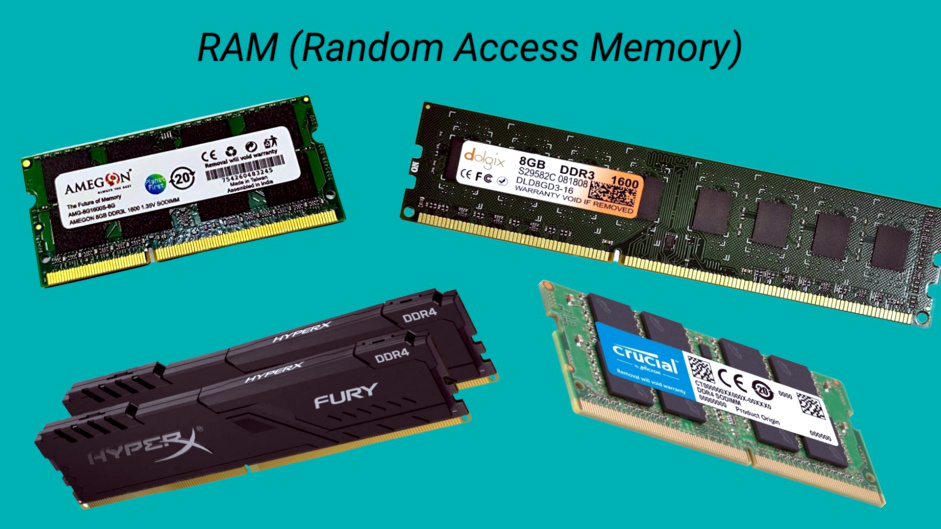
Random Access Memory (RAM) is one of the essential components of modern computer systems, playing a pivotal role in determining the speed and efficiency of a device. RAM acts as a temporary storage area where data and applications can be accessed quickly by the CPU. When you open a program or file, it is loaded from your hard drive into RAM, allowing for rapid reading and writing of data. The fundamental purpose of RAM is to provide a fast and efficient means for the CPU to retrieve and manipulate data without the delays associated with traditional storage devices like hard disks.
The two primary types of RAM are Dynamic RAM (DRAM) and Static RAM (SRAM). Understanding these types is crucial as each serves different functions and applications within computing:
Types of RAM
Both DRAM and SRAM are critical to different computing environments, and recognizing their unique characteristics helps in choosing the right type based on application needs.
- Dynamic RAM (DRAM)
- Requires periodic refreshing to maintain data integrity
- Typically slower than SRAM, but offers higher density, making it more cost-effective for larger memory capacities
- Commonly used as the main system memory in computers
- Static RAM (SRAM)
- Retains data bits in its memory as long as power is supplied, with no need for refreshing
- Faster than DRAM, but also more expensive and less dense, making it ideal for high-speed caches in processors
- Used in applications where speed is critical, such as CPU caches
The importance of RAM in the overall performance of a computer system cannot be overstated. It directly influences how many programs can run simultaneously and how quickly they operate. Sufficient RAM allows for smooth multitasking, where users can switch between applications without significant lag. For instance, in a typical office scenario, having 16GB of RAM versus 8GB can mean the difference between a seamless experience when running multiple applications like word processors, spreadsheets, and web browsers versus noticeable slowdowns and delays.
In summary, Random Access Memory is crucial for effective computing, impacting both speed and multitasking capabilities. The choice between DRAM and SRAM varies based on specific needs, but both types serve essential roles in ensuring devices operate efficiently.
The Role of RAM in Gaming Performance
Random Access Memory (RAM) serves as a crucial component in the gaming experience, influencing various performance metrics such as frame rates and loading times. As games become more complex, the demand for adequate RAM increases, impacting how seamlessly a game runs and how quickly it responds to player actions. Understanding the relationship between RAM and gaming can help gamers make informed decisions when upgrading their systems.
The influence of RAM on gaming performance is particularly evident in two significant areas: frame rates and loading times. Frame rates, measured in frames per second (FPS), determine how smoothly a game appears on-screen. Insufficient RAM can lead to stuttering or lagging when the system struggles to load assets quickly enough to keep up with gameplay. For instance, a game like “Call of Duty: Warzone” can perform poorly on systems with only 8 GB of RAM, often resulting in FPS drops below the smooth 60 FPS standard. On the other hand, systems equipped with 16 GB or more RAM tend to maintain higher frame rates, ensuring a more fluid gaming experience.
Recommended RAM Specifications for Modern Gaming
Modern gaming requires specific RAM specifications to achieve optimal performance. The general recommendation for most current titles is a minimum of 16 GB of RAM, which allows for smooth multitasking and better handling of resource-intensive games. Comparing this to older systems, many of which operated efficiently with just 4 or 8 GB of RAM, highlights the significant evolution in gaming requirements.
For example, games released in the early 2010s, such as “Skyrim,” could run well on 4 GB of RAM. In contrast, newer titles like “Cyberpunk 2077” or “Microsoft Flight Simulator” demand at least 16 GB to fully utilize their graphical abilities and vast open worlds.
Impact of RAM Speed and Capacity on Gaming Experience
Both the speed and capacity of RAM can have a profound effect on gaming performance. RAM speed, measured in megahertz (MHz), affects how quickly data is processed. For instance, RAM running at 3200 MHz can provide noticeable improvements in load times and overall responsiveness compared to 2400 MHz RAM.
The capacity of RAM also plays a vital role; while 16 GB is the current standard, some high-performance setups utilize 32 GB to ensure seamless operation across multiple applications. The correlation can be quantified: upgrading from 8 GB to 16 GB can yield an FPS increase of anywhere from 10% to 30% in demanding titles, while faster RAM can contribute to reduced loading times by as much as 20%, depending on the game and system architecture.
In conclusion, understanding the role of RAM in gaming is essential for optimizing performance and enhancing the overall experience. As games continue to evolve, ensuring that your system meets or exceeds RAM specifications will undoubtedly lead to a more enjoyable and immersive gaming journey.
RAM Upgrades
Upgrading your RAM can significantly enhance the performance of your computer, whether it’s a laptop or a desktop. With increasing demands from applications and games, understanding when and why to upgrade your RAM becomes essential for an optimal computing experience.
There are various scenarios where upgrading your RAM can deliver noticeable improvements. For gamers, having sufficient RAM enhances game loading times and overall performance, particularly with resource-intensive titles. Content creators, such as video editors and graphic designers, often rely on RAM-hungry software that can benefit from additional memory, allowing for smoother multitasking and faster rendering times. Even for general users, if you notice sluggish performance while running multiple applications or browser tabs, a RAM upgrade can provide a better experience.
Considerations for Upgrading RAM
Understanding the procedures for upgrading RAM is crucial for both laptops and desktops. The right tools and safety precautions can help ensure a smooth upgrade process.
To start, gather the necessary tools:
- Anti-static wrist strap to prevent static electricity damage to components.
- Phillips screwdriver for opening the computer casing.
- New RAM modules that are compatible with your system.
Safety precautions are equally important:
- Always power off your device and unplug it from the electrical source before starting the upgrade.
- Ground yourself using an anti-static wrist strap or by touching a metal surface to avoid static discharge.
- Handle RAM modules by the edges without touching the gold connectors to prevent damage.
Choosing the Right RAM for Your System
Selecting the appropriate RAM for your system requires careful consideration of compatibility and performance factors.
1. Check System Compatibility: Confirm the type of RAM your system supports, whether it’s DDR3, DDR4, or another type. This information can usually be found in your system’s manual or manufacturer’s website.
2. Determine Capacity Needs: Assess how much RAM you currently have and how much more you need. For general use, 8GB is typically sufficient, while gaming and content creation may require 16GB or more.
3. Consider Speed and Latency: Look at the RAM speed (measured in MHz) and latency (CL rating). Faster RAM can improve performance, but the actual difference may vary based on your usage scenario.
4. Evaluate Dual-Channel Configuration: For optimal performance, consider installing RAM in pairs to take advantage of dual-channel memory architecture, ensuring that the modules are of the same size and speed.
5. Purchase from Reputable Brands: Choose RAM from trusted manufacturers to ensure reliability and warranty support. Brands like Corsair, Kingston, and Crucial are well-regarded in the market.
Following these steps can help streamline the RAM upgrade process, ensuring your system performs at its best and meets your specific computing needs.
Common Myths and Misunderstandings About RAM
RAM (Random Access Memory) is often surrounded by myths and misunderstandings that can lead to confusion about its role in computing. Many users believe they need more RAM than they actually do for basic tasks, or they may not fully grasp the differences between RAM and storage solutions. This section aims to clarify these misconceptions and provide insight into the significance of RAM specifications such as frequency and latency.
Misconceptions About RAM Requirements
A prevalent myth suggests that users need an excessive amount of RAM for everyday tasks, such as web browsing or word processing. In reality, most basic tasks can be efficiently handled with a modest amount of RAM. Here are some key points to consider regarding RAM capacity:
- For general use, such as browsing the internet and using office applications, 8GB of RAM is often sufficient.
- Gamers or professionals using demanding applications may benefit from 16GB to 32GB, but this is not necessary for everyone.
- Operating systems like Windows 10 or 11 can run adequately on systems with as little as 4GB of RAM, although performance may be sluggish.
Differences Between RAM and Storage
Another common misunderstanding involves the roles of RAM versus storage devices like SSDs (Solid State Drives) and HDDs (Hard Disk Drives). While both are critical components of a computer, they serve very different functions. The following points highlight their distinctions:
- RAM is volatile memory used for temporary data storage, allowing the CPU to access information quickly while performing tasks.
- Storage devices (SSDs and HDDs) are non-volatile, retaining data even when the computer is turned off, making them suitable for long-term data storage.
- Having more RAM can improve multitasking and overall system responsiveness, but it does not increase storage capacity or speed up file access from storage devices.
Impact of RAM Frequency and Latency
Many users underestimate the importance of RAM frequency and latency when assessing system performance. It’s essential to understand how these specifications interact with overall system capabilities. Here are the key aspects:
- RAM frequency (measured in MHz) indicates how fast the RAM can read or write data. Higher frequency RAM can transfer data more quickly, which is particularly beneficial in memory-intensive applications.
- Latency, measured in CL (CAS latency), refers to the delay in accessing data stored in RAM. Lower latency translates to faster performance, especially in scenarios requiring quick data fetching.
- While both frequency and latency can improve performance, the actual impact on tasks may vary, depending on the specific applications being used.
“More RAM does not always equate to better performance; it’s crucial to balance capacity, frequency, and latency based on your specific needs.”
Future Trends in RAM Technology
The landscape of RAM technology is rapidly evolving, with significant advancements on the horizon that promise to enhance computing performance dramatically. Emerging technologies such as DDR5 and future generations are set to redefine the capabilities of memory, impacting various sectors from gaming to artificial intelligence (AI) and cloud computing. This shift offers not just speed improvements but also higher efficiency and capacity, shaping how users and businesses interact with technology.
Emerging Technologies in RAM
The introduction of DDR5 RAM signifies a leap forward in memory technology, boasting higher bandwidth and reduced power consumption compared to its predecessor, DDR4. This transition is crucial for applications that demand high-speed data transfer. DDR5 provides a peak bandwidth of up to 6400 MT/s, doubling the previous generation’s performance, and establishes a foundation for future advancements.
Key features of DDR5 RAM include:
- Increased Capacity: DDR5 supports modules up to 64 GB, enabling devices to handle more applications simultaneously without lag.
- Enhanced Efficiency: With improved power management, DDR5 operates at a lower voltage, which is essential for extending battery life in mobile devices.
- Improved Reliability: DDR5 incorporates built-in error correction, making systems more robust against data corruption.
“The increased bandwidth and capacity of DDR5 are not just enhancements; they represent a fundamental shift in how data is processed and utilized.”
Impact on Gaming and AI
The implications of advanced RAM technologies extend significantly into gaming and AI realms. As gamers seek ultra-responsive experiences, the capabilities of DDR5 allow for smoother graphics, reduced load times, and enhanced multitasking, all of which are crucial for immersive gameplay. Moreover, AI applications, which require massive amounts of data to be processed efficiently, stand to benefit immensely from faster and more reliable memory solutions.
In gaming, the integration of DDR5 can improve:
- Graphics Performance: Higher frame rates and resolutions can be achieved, elevating the overall user experience.
- Loading Times: Quick data retrieval allows for seamless transitions and reduced waiting periods.
AI models that process vast datasets will see enhanced performance through:
- Rapid Data Processing: Faster access to memory accelerates training times and improves responsiveness in real-time applications.
- Increased Model Complexity: Higher memory capacity enables the deployment of more sophisticated algorithms and larger datasets.
Effects on Cloud Computing
Cloud computing is another area poised for transformation with advancements in RAM technology. As businesses increasingly rely on cloud services for their operations, the demand for faster, more efficient memory solutions grows. The transition to DDR5 and beyond could enhance performance in several ways:
- Scalability: Enhanced RAM allows cloud providers to scale services more efficiently, accommodating growing data needs without compromising speed.
- Cost Efficiency: Improved power efficiency directly translates to lower operational costs for cloud services, benefiting both providers and users.
- Better Virtualization: With higher memory capacities, cloud environments can support more virtual machines simultaneously, maximizing resource use.
The evolution of RAM technology will not only benefit high-performance applications but also create practical advantages for everyday users and businesses alike. From more responsive devices to cost-effective solutions in cloud services, the advancements in RAM will ultimately lead to a more efficient and enjoyable computing experience across the board.
Troubleshooting RAM Issues
When experiencing problems with your computer, RAM issues often emerge as a primary suspect. Symptoms like system crashes and sluggish performance can signal underlying memory challenges. Understanding these common problems and their potential causes can aid in effective troubleshooting, ensuring your system runs smoothly.
Common RAM-related issues can manifest in various ways. System crashes might occur when the memory is overloaded or when there’s a fault within the RAM modules themselves. Slow performance often indicates inadequate memory for the tasks at hand, or it could be an indication of faulty RAM. Other symptoms include frequent application freezes, blue screens of death (BSOD), and slow boot-up times. Identifying the root cause is crucial for effective resolution.
Common RAM Issues and Diagnostic Tools
Utilizing diagnostic tools can significantly aid in pinpointing RAM-related issues. These tools can identify and diagnose problems effectively, allowing for timely remediation. Below are some popular diagnostic tools and a brief overview of their functionality:
- Windows Memory Diagnostic: A built-in tool that checks your computer’s memory for errors. To use it, type ‘Windows Memory Diagnostic’ in the Start menu, choose to restart and check for problems, and follow the prompts.
- Memtest86: A more advanced option, this tool runs thorough checks on RAM by booting from a USB drive. It performs a series of tests to identify any memory faults. Download the ISO, create a bootable USB drive, and follow the on-screen instructions after booting from it.
- CPUID CPU-Z: This tool provides detailed information about your RAM, such as type, size, and speed. Monitoring these specs can help in identifying compatibility issues or misconfigured settings.
Using these tools effectively involves following specific steps to ensure accurate results. For instance, when using Memtest86, it is essential to allow it to run multiple passes to uncover intermittent issues that may not appear on the first run.
Troubleshooting Steps for Memory Issues
Addressing memory problems requires a systematic approach. Here are essential troubleshooting steps that can help resolve common RAM issues:
- Reseat RAM Modules: Sometimes, RAM modules can become loose over time. Power down the computer, unplug it, and carefully remove the RAM sticks before reinserting them securely.
- Check for Compatibility: Ensure that the RAM modules are compatible with your motherboard. Mismatched RAM can lead to performance issues or system instability.
- Run Diagnostic Tests: Use the aforementioned diagnostic tools to check for any memory errors. Document any errors that arise, as they can provide insight into which module may need replacing.
- Test Modules Individually: If multiple RAM sticks are installed, test them one at a time. This can help isolate a faulty module, as it will allow you to determine if one of the sticks is causing the issue.
- Update BIOS: Sometimes, an outdated BIOS can lead to memory issues. Check the motherboard manufacturer’s website for any updates that may improve memory compatibility and performance.
By following these steps, many memory-related problems can be effectively diagnosed and resolved, restoring your computer’s functionality and performance.
“Regularly monitoring and maintaining your RAM can prevent many issues from arising in the first place.”
Final Conclusion
In summary, Random Access Memory (RAM) is essential for efficient computing, influencing everything from everyday tasks to high-performance gaming. By recognizing the value of RAM, its types, and the circumstances in which upgrading makes sense, users can make informed decisions to optimize their systems. As technology progresses, staying updated on RAM advancements will be pivotal for both individual users and businesses looking to leverage the power of computing.
FAQ Guide
What is the difference between RAM and storage?
RAM is temporary memory used for active processes, while storage (like SSDs and HDDs) is permanent memory for long-term data storage.
How much RAM do I need for basic tasks?
Generally, 8GB of RAM is sufficient for basic tasks like web browsing and office applications, but 16GB or more is recommended for gaming and multitasking.
Does more RAM always improve performance?
Not necessarily; while more RAM can improve performance for demanding tasks, excessive RAM beyond a certain point may not yield noticeable benefits.
What is RAM latency and how does it affect performance?
RAM latency refers to the delay before data transfer starts after a request. Lower latency typically leads to better performance, especially in time-sensitive applications.
Can I mix different types of RAM in my computer?
Mixing different types of RAM is possible, but it’s important to ensure compatibility with your motherboard, and the system will run at the speed of the slowest module.