Delving into Microsoft Azure, we explore a platform that has revolutionized cloud computing for businesses of all sizes. With its extensive range of services, Azure caters to diverse needs, from analytics to artificial intelligence, allowing companies to innovate and streamline operations efficiently. The significance of cloud computing in modern enterprises cannot be overstated; it’s not just about storage but the ability to drive transformation and enhance agility in an increasingly competitive marketplace.
This introduction sets the stage for a thorough examination of Azure’s core features, security frameworks, and the vital role it plays in digital transformation. By understanding how Azure stands out from its competitors, we can appreciate its unique offerings and the advantages it provides to organizations looking to harness the power of the cloud.
Understanding the Core Features of Microsoft Azure
Microsoft Azure is a comprehensive cloud computing platform that provides a wide range of services tailored to meet the diverse needs of modern businesses. As organizations increasingly shift to digital solutions, Azure’s offerings stand out for their scalability, flexibility, and integration with existing enterprise systems. By leveraging Azure, companies can enhance their operational efficiency, improve responsiveness, and innovate faster, making it an essential tool in today’s competitive landscape.
The significance of cloud services in modern enterprises cannot be overstated. As businesses face the challenges of digital transformation, cloud platforms like Microsoft Azure play a pivotal role in facilitating this transition. Cloud services allow organizations to access powerful computing resources and applications over the internet, eliminating the need for substantial upfront capital investment in hardware and software. This model not only reduces costs but also increases agility, enabling businesses to scale their operations in response to demand fluctuations.
Moreover, the cloud provides enhanced collaboration, allowing teams to work together seamlessly regardless of their physical location. With features such as real-time data sharing and integrated communication tools, employees can be more productive and innovative. Furthermore, cloud services bolster data security, as they offer advanced features such as encryption and compliance with industry regulations.
The unique capabilities of Azure compared to other cloud platforms stem from its extensive range of services and tools designed for various business needs. For instance, Azure stands out due to its strong integration with Microsoft products, making it an ideal choice for organizations already using tools like Office 365, Dynamics 365, or Power BI. Notably, Azure’s capabilities include:
Core Offerings of Microsoft Azure
Azure encompasses a wide array of services that cater to different aspects of cloud computing, including:
- Compute Services: Azure offers virtual machines, app services, and Kubernetes for container management, allowing businesses to deploy and manage applications effortlessly.
- Storage Solutions: With options like Blob Storage and Azure Cosmos DB, organizations can store, manage, and analyze vast amounts of data securely and efficiently.
- Networking Capabilities: Azure provides features such as Virtual Networks and Content Delivery Network (CDN) to ensure fast and secure connectivity for applications.
- Analytics and Machine Learning: Tools like Azure Synapse Analytics and Azure Machine Learning empower businesses to gain insights from their data and build intelligent applications.
- Security and Compliance: Azure emphasizes security with features like Azure Security Center and compliance certifications that help businesses meet regulatory requirements.
In summary, Microsoft Azure’s robust features and unique offerings position it as a leader in the cloud space, enabling enterprises to embrace digital innovation while ensuring that they have the right tools to adapt to an ever-evolving landscape.
Exploring Azure’s Security Framework
Microsoft Azure has established itself as a leading cloud computing platform, not only for its robust functionality but also for its comprehensive security measures. With increasing concerns about data breaches and cyber threats, Azure prioritizes the protection of user data through an extensive range of security controls. These security measures are designed to safeguard sensitive information and maintain the integrity of services offered on the platform.
Integrated Security Measures in Azure
Azure incorporates a multi-layered security framework that includes various features to protect user data. At the core of this framework is Azure Security Center, which provides a unified infrastructure to manage security across hybrid cloud environments. This center continuously assesses the security posture of Azure services and offers recommendations for improving security. Some key security measures include:
- Data Encryption: Azure employs both encryption at rest and in transit, ensuring that data is secure whether stored or being transmitted over the network.
- Identity and Access Management: Azure Active Directory provides robust identity management, allowing organizations to control access to resources using multi-factor authentication, conditional access policies, and single sign-on.
- Network Security: Azure includes advanced network security features such as Azure Firewall and Network Security Groups, which help to protect applications and services from unauthorized access and cyberattacks.
- Threat Intelligence: Azure leverages machine learning and artificial intelligence to detect and respond to potential threats in real time, helping organizations to preemptively address vulnerabilities.
Compliance Certifications and Their Importance
Azure is compliant with numerous industry standards and regulations, which is crucial for businesses that handle sensitive information. These compliance certifications include ISO 27001, GDPR, HIPAA, and many more. These certifications validate Azure’s commitment to maintaining high security and privacy standards, helping organizations meet their regulatory requirements effectively.
Addressing Security Challenges in Cloud Computing
Security challenges in cloud computing are diverse and ever-evolving. Azure addresses these issues through a combination of innovative technologies and proactive strategies. One of the primary challenges is the risk of data breaches, which Azure mitigates by employing advanced encryption methods and robust identity management systems. Furthermore, by utilizing a shared responsibility model, Azure clarifies the security roles of both the service provider and the customer, ensuring clarity in data protection responsibilities.
Azure also actively monitors its infrastructure through continuous auditing and vulnerability assessments. This proactive approach not only helps in identifying potential risks early but also enables swift remediation actions. Moreover, Azure’s commitment to transparency and regular compliance audits reinforces user confidence in its security framework.
By combining cutting-edge technology with stringent compliance measures, Azure effectively addresses the myriad security challenges posed by cloud computing, offering businesses a secure environment to operate and innovate.
The Role of Azure in Digital Transformation
Microsoft Azure plays a pivotal role in the digital transformation journeys of businesses across various sectors. As organizations seek to modernize their operations, enhance customer experiences, and streamline processes, Azure’s cloud services provide a robust and flexible foundation. By leveraging Azure, companies can harness advanced technologies like artificial intelligence, analytics, and the Internet of Things (IoT) to drive innovation and improve overall performance.
One of the critical ways Azure facilitates digital transformation is through its comprehensive suite of services that cater to diverse business needs. Azure enables organizations to deploy applications quickly, scale infrastructure on demand, and utilize data analytics to gain insights that drive decision-making. This agility allows businesses to respond rapidly to market changes, optimize efficiency, and reduce operational costs.
Industries Successfully Transforming with Azure Services
Several industries have realized significant benefits from adopting Microsoft Azure in their digital transformation initiatives. The following examples illustrate how Azure has been instrumental in transforming business operations:
- Healthcare: Hospitals and healthcare providers are using Azure to improve patient care through data management and analytics. For instance, St. Luke’s University Health Network utilized Azure to integrate and analyze patient data, enhancing their predictive capabilities for better treatment plans.
- Financial Services: Financial institutions leverage Azure for secure, scalable platforms that comply with regulations. The American Express Company adopted Azure to enhance its fraud detection systems, leading to quicker response times and improved customer trust.
- Retail: Retailers are harnessing Azure to create personalized shopping experiences and efficient supply chain management. Walmart employs Azure to analyze customer data and optimize inventory, resulting in enhanced customer satisfaction and operational efficiency.
- Manufacturing: Manufacturers are increasingly turning to Azure for IoT solutions that connect machinery and improve production efficiency. Rolls-Royce utilizes Azure IoT to monitor engine performance in real-time, allowing for predictive maintenance and reduced downtime.
The impact of Azure on operational agility and efficiency is profound. By adopting a cloud-first strategy with Azure, businesses can streamline their operations, enabling them to pivot quickly in response to market demands. With Azure’s scalability, organizations no longer have to invest heavily in physical infrastructure, allowing for cost savings and operational flexibility. Moreover, Azure’s robust security features empower businesses to protect sensitive data while maintaining compliance with industry regulations.
Additionally, Azure’s integrated tools for data analysis foster a culture of data-driven decision-making, allowing companies to uncover insights that drive strategic initiatives. By automating routine tasks through Azure’s cloud services, employees can focus on more impactful work, thereby increasing productivity. The results are evident: businesses utilizing Azure experience increased agility, operational efficiency, and enhanced customer satisfaction, ultimately positioning them for success in the digital age.
Analyzing Azure’s Cost Management Tools
Microsoft Azure offers a robust suite of cost management tools designed to help organizations gain visibility and control over their cloud spending. With the growing adoption of cloud services, effectively managing costs becomes paramount. Azure’s cost management features empower businesses to track, allocate, and optimize their expenses, ensuring that they get the best value for their investment.
A key feature of Azure’s cost management tools is the Cost Analysis dashboard, which provides detailed insights into spending patterns. This tool allows organizations to filter costs by resource, subscription, and tags, making it easier to pinpoint where funds are being utilized. Additionally, the budgeting feature enables teams to set financial limits and receive alerts when they approach those limits, maintaining financial discipline across departments.
Optimizing Cloud Spending Using Azure Tools
Implementing a strategic approach to cloud spending is essential for any organization looking to make the most of Azure’s offerings. Azure provides several features that can help streamline expenses and enhance overall efficiency.
The following elements are crucial for optimizing cloud spending:
- Cost Management + Billing: This tool includes features for tracking usage and costs across subscriptions, providing insights into how resources are consumed.
- Azure Advisor: This service recommends cost-saving measures based on your current usage. It analyzes your configurations and suggests optimizations for reserved instances, idle resources, and more.
- Resource Tagging: Tagging resources helps in organizing and tracking costs by projects or teams, allowing for more accurate reporting and accountability.
- Budgets and Alerts: Setting budgets with alerts helps organizations stay informed about their spending limits and receive notifications if costs exceed predefined thresholds.
- Azure Reservations: Committing to reserved instances can lead to significant cost savings, providing discounts for long-term resource commitments.
Implementing a cost management strategy within cloud environments yields numerous benefits. For one, it fosters financial transparency and accountability across the organization. By tracking spending meticulously, teams can identify and eliminate inefficiencies, thereby reducing waste.
Moreover, organizations can predict future costs based on current consumption patterns, allowing for better financial planning and allocation of resources. By adopting Azure’s cost management tools, businesses can align their cloud spending with enterprise budgets and strategic goals.
“Effective cost management is not just about cutting expenses; it’s about maximizing the value derived from every dollar spent.”
This ensures that organizations are not only saving costs but also investing wisely in the services that drive their business forward. Furthermore, with real-time analytics at their disposal, teams can adjust their strategies swiftly in response to changing market dynamics or business needs.
Comparing Azure with Competitors
In the rapidly evolving landscape of cloud computing, Microsoft Azure stands out among its competitors, particularly Amazon Web Services (AWS) and Google Cloud Platform (GCP). Each of these platforms offers a unique set of features and services, targeting different segments of the market. Understanding the strengths and weaknesses of Azure in comparison to AWS and GCP is crucial for businesses looking to choose the right cloud service provider.
When comparing Azure to its competitors, it’s essential to examine several key areas where each platform excels or may fall short. These areas include service offerings, pricing, performance, and enterprise integration capabilities. Here’s a closer look at how Azure stacks up against AWS and Google Cloud:
Strengths and Weaknesses of Azure
Azure offers a comprehensive suite of services ranging from virtual machines to AI and machine learning capabilities. Its integration with Microsoft products is a significant advantage for enterprises already using tools like Office 365 and Dynamics 365. Azure’s hybrid cloud capabilities allow companies to leverage both on-premises and cloud resources effectively.
However, Azure does have some weaknesses. For instance, some users report that its user interface can be less intuitive compared to AWS and GCP, leading to a steeper learning curve for new users. Additionally, while Azure is rapidly growing, AWS remains the dominant player in terms of market share and service maturity.
The strong points of Azure can be summarized as follows:
- Enterprise Integration: Seamless connectivity with Microsoft environments and tools.
- Hybrid Solutions: Flexibility in combining on-premises and cloud infrastructures.
- Comprehensive Service Offerings: Extensive range of tools, including IoT and AI services.
- Compliance and Security: Strong focus on compliance with regulations and security standards.
“Azure’s ability to integrate with existing Microsoft services creates a unique selling proposition that is difficult for competitors to replicate.”
In contrast, some areas where Azure may struggle compared to AWS and Google Cloud include:
- Learning Curve: Some users find Azure’s interface less user-friendly.
- Documentation: May lack the depth and clarity found in AWS documentation.
What truly sets Azure apart are its unique selling propositions, including seamless integration, strong hybrid cloud capabilities, and robust enterprise-level security features. These elements make Azure an attractive choice for businesses already invested in the Microsoft ecosystem, allowing them to maximize their current investments while leveraging the power of cloud services effectively.
Evaluating Azure’s Machine Learning Capabilities
Microsoft Azure offers a robust suite of machine learning services that empower businesses to harness the power of artificial intelligence (AI) and data science. With a range of tools and frameworks designed to cater to the needs of various users, from novice data scientists to seasoned machine learning engineers, Azure is a go-to platform for developing and deploying machine learning models. This section delves into Azure’s machine learning offerings, their applications, and successful implementations that illustrate the platform’s capabilities.
Machine Learning Services and Applications
Azure provides a wide array of services focused on machine learning, including Azure Machine Learning, Automated Machine Learning (AutoML), and Azure Cognitive Services. These tools enable organizations to create, train, and deploy machine learning models seamlessly. Here are some key services offered:
- Azure Machine Learning: A comprehensive cloud service that allows users to build, train, and deploy machine learning models at scale. It provides a collaborative workspace and integrates with open-source tools like TensorFlow and PyTorch.
- Automated Machine Learning (AutoML): This feature simplifies the model-building process by automating the selection and tuning of algorithms, making it accessible for users with varying levels of expertise.
- Azure Cognitive Services: A suite of APIs designed to enable developers to add intelligent features such as vision, speech, language understanding, and decision-making into applications without needing deep knowledge of machine learning.
Azure’s machine learning capabilities are not just theoretical; they have been successfully implemented across various sectors. For instance, the use of Azure Machine Learning by a healthcare company to predict patient readmissions demonstrates the platform’s potential. By analyzing historical patient data, the model was able to identify high-risk patients, allowing healthcare providers to intervene proactively.
The process of creating and deploying machine learning models on Azure is designed to be efficient and user-friendly. Azure facilitates this through its integrated workspace, which allows teams to collaborate effectively. The platform supports both code-first and low-code approaches, catering to different skill levels. Users can utilize Jupyter notebooks for coding or drag-and-drop interfaces for model creation.
Once models are developed, Azure enables easy deployment through its managed services. The deployment can be done on Azure’s cloud, on-premises, or at the edge, depending on the application requirements. With built-in monitoring and management tools, Azure ensures that models can be continuously improved over time.
Overall, Azure’s machine learning services offer a powerful ecosystem that not only simplifies the model development process but also ensures that businesses can leverage AI effectively for various applications, driving innovation and efficiency.
Implementing Azure DevOps for Continuous Integration
Azure DevOps is a comprehensive suite of development tools that provide a variety of features designed to enhance the efficiency and effectiveness of software development processes. With its robust capabilities, Azure DevOps enables teams to implement continuous integration (CI) and continuous delivery (CD) seamlessly. This approach fosters an environment where software updates can be deployed quickly and reliably, ultimately improving project outcomes.
Azure DevOps is equipped with several key features that support CI and CD methodologies. These include Azure Repos for source control, Azure Pipelines for CI/CD automation, Azure Test Plans for managing testing, and Azure Artifacts for package management. Together, these tools facilitate a streamlined workflow, allowing developers to build, test, and deploy applications automatically. The integration of Git repositories within Azure Repos fosters collaboration among team members and enhances version control. Meanwhile, Azure Pipelines supports multi-platform builds and releases, accommodating various coding languages and frameworks.
Best Practices for Utilizing Azure DevOps
To maximize the potential of Azure DevOps in software development projects, adopting best practices is essential. Here are several recommendations that can significantly enhance CI/CD processes:
1. Automate Build and Deployment Processes: Automating builds and deployments with Azure Pipelines reduces manual errors and accelerates delivery. This should include defining clear criteria for successful builds and automatic rollback mechanisms in case of failures.
2. Implement Comprehensive Testing: Utilize Azure Test Plans to create and manage automated tests. Regular testing not only ensures code quality but also provides immediate feedback to developers, allowing for quick iterations and fixes.
3. Leverage Continuous Feedback Loops: Foster a culture of continuous feedback among team members. Regular code reviews and feedback sessions can enhance code quality and improve team collaboration.
4. Use Feature Flags for Safe Deployments: Implementing feature flags allows teams to deploy code to production while controlling the exposure of new features to users. This minimizes risk and enables gradual rollouts.
5. Monitor Performance and Usage: Utilize Azure Monitor and Application Insights to gather data on application performance and user behavior. This information is crucial for identifying areas for improvement and optimizing future deployments.
Incorporating Azure DevOps into development workflows provides numerous advantages. Firstly, it significantly accelerates the software delivery process by enabling teams to automate repetitive tasks, thus freeing developers to focus on more complex problems. Azure DevOps promotes collaboration through integrated communication tools and shared repositories, enabling teams to work cohesively regardless of geographical locations.
Moreover, the ability to conduct continuous testing ensures that issues are identified and resolved early in the development cycle, reducing the cost and time associated with late-stage bug fixes. The robust reporting and analytics tools available in Azure DevOps allow teams to track progress in real time, making it easier to align development efforts with business objectives.
Another key benefit is the enhanced security features that come with Azure DevOps. Integrated security measures help protect code integrity and ensure compliance with industry standards. Additionally, the flexibility of Azure DevOps to integrate with various third-party tools and services allows teams to tailor their workflows to better suit specific project needs. Overall, the incorporation of Azure DevOps fosters a more agile, collaborative, and efficient development environment, significantly improving project outcomes and team productivity.
Understanding Azure’s Global Infrastructure
Microsoft Azure’s extensive global presence plays a crucial role in its service delivery and overall performance. With data centers strategically located across numerous regions worldwide, Azure enables businesses to host applications and store data closer to their users. This geographical distribution minimizes latency, enhances performance, and provides redundancy and reliability that are critical for enterprises operating on a global scale.
One of the key benefits of Azure’s regional availability lies in its ability to reduce latency and improve service performance. When applications are hosted in data centers nearer to end-users, the time taken for data to travel is significantly decreased. This is particularly important for applications that require real-time data processing, such as streaming services, online gaming, and financial applications. For instance, a company operating in Europe can leverage Azure’s European data centers to ensure faster load times for their users, enhancing customer satisfaction and engagement.
Implications of Azure’s Infrastructure on Disaster Recovery and Business Continuity Strategies
The implications of Azure’s global infrastructure on disaster recovery and business continuity strategies are profound. The distributed nature of Azure’s data centers allows organizations to implement robust disaster recovery plans that can efficiently handle outages or catastrophic failures. By replicating data across multiple regions, businesses can ensure that their critical applications remain available even if one data center goes offline.
To illustrate, consider a financial institution that utilizes Azure for its core banking services. This institution can set up geo-redundant backups, meaning that if a natural disaster impacts a data center in one region, their operations can seamlessly switch to another region, ensuring minimal disruption.
The following points highlight how Azure’s infrastructure facilitates superior disaster recovery:
-
Geo-Redundancy:
Azure provides options for replicating data across different geographic locations.
-
Automated Recovery Solutions:
Azure Site Recovery automates disaster recovery processes, reducing the complexity of manual interventions.
-
Regular Compliance Audits:
Azure’s infrastructure adheres to various global compliance standards, which is crucial for businesses in regulated industries.
-
Scalable Solutions:
Businesses can scale their disaster recovery plans according to their needs without significant upfront investments.
In summary, Azure’s global network not only enhances performance and reduces latency but also fortifies business resilience against disruptions. With its advanced disaster recovery mechanisms and geographic diversity, organizations can confidently operate and innovate without the looming threat of downtime.
Customizing Azure Solutions for Business Needs
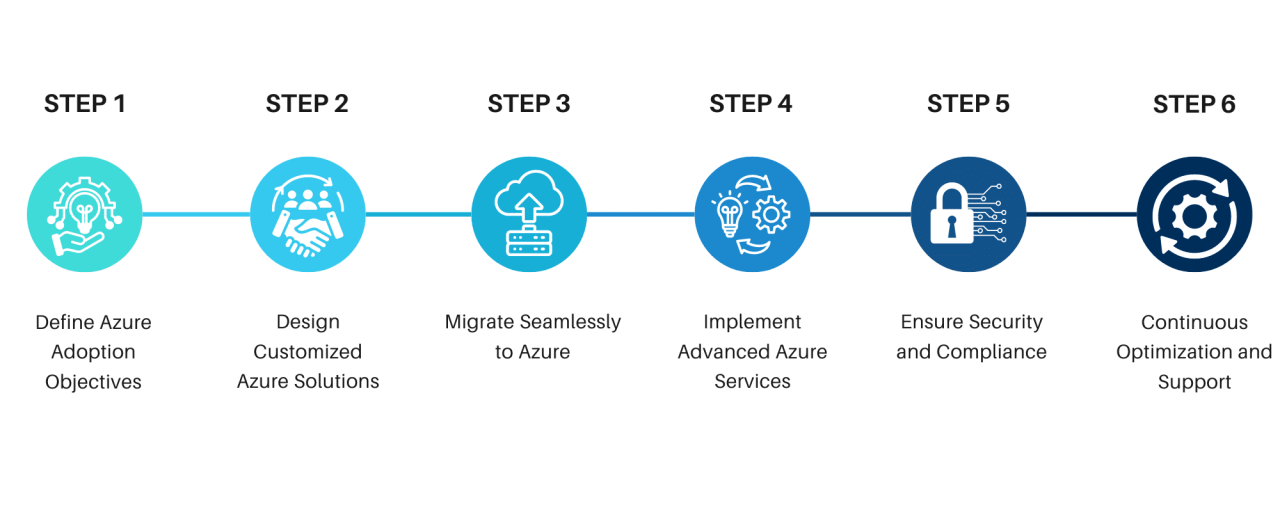
In today’s dynamic business landscape, leveraging cloud technologies like Microsoft Azure is critical for organizations aiming to enhance efficiency and drive growth. However, a one-size-fits-all approach often falls short of addressing unique business requirements. Customizing Azure solutions enables businesses to tailor their cloud environments, optimize workflows, and achieve their specific objectives.
The process of tailoring Azure solutions involves several key steps aimed at ensuring alignment with business goals. First, organizations should conduct a thorough assessment of their existing infrastructure, applications, and workloads. This assessment helps identify gaps and opportunities for improvement in their cloud strategy. Following this, businesses can define their specific requirements by collaborating with stakeholders across departments to gather insights on their operational needs.
Once the requirements are established, organizations can explore Azure’s extensive range of services, such as Azure Functions for serverless computing, Azure Logic Apps for workflow automation, and Azure Machine Learning for advanced analytics, to determine which tools best serve their goals. Implementation should be iterative, allowing for testing and feedback to refine solutions continuously. Security and compliance considerations are also paramount; therefore, custom solutions should integrate Azure’s security features to protect sensitive data.
Successful Customization Case Studies
Understanding how other organizations have successfully customized their Azure environments can provide valuable insights. For instance, a global retail chain transformed its inventory management system using Azure services. By integrating Azure IoT Hub with their existing systems, they achieved real-time visibility into inventory levels, reducing stockouts and optimizing warehouse operations. This customization led to a 20% decrease in operational costs within the first year.
Similarly, a healthcare provider utilized Azure to create a tailored patient management system. By leveraging Azure’s data analytics capabilities, they could analyze patient data more effectively, enhancing patient care and improving operational efficiency. As a result, patient satisfaction scores increased significantly, affirming the importance of customizing solutions to meet specific industry needs.
The significance of flexibility and customization in cloud solutions cannot be overstated. In a rapidly evolving marketplace, organizations must adapt to changing demands and technologies. Customized Azure solutions empower businesses to stay agile, allowing them to scale operations quickly, integrate new applications seamlessly, and respond to customer needs effectively. Moreover, tailored solutions enhance performance by optimizing resource allocation and minimizing waste, leading to substantial cost savings. As organizations continue to navigate the complexities of digital transformation, the ability to customize cloud services is not just beneficial; it is essential for sustained growth and competitive advantage.
Future Trends and Developments in Microsoft Azure
As the cloud computing landscape continues to evolve, Microsoft Azure remains at the forefront, adapting and innovating to meet the needs of businesses around the globe. One key trend is the increasing integration of artificial intelligence and machine learning capabilities into Azure’s service offerings. These advancements are expected to streamline operations, enhance data analytics, and improve decision-making processes for organizations. Additionally, the shift towards multi-cloud and hybrid cloud solutions is gaining traction, allowing businesses to leverage the strengths of multiple platforms while maintaining control over their data and applications.
Emerging Technologies Influencing Azure’s Future
Several emerging technologies are anticipated to significantly influence Microsoft Azure’s service offerings in the near future. These include:
– Quantum Computing: With the development of quantum computing, Azure is expected to offer solutions that harness this technology to solve complex problems much faster than classical computers. This can lead to breakthroughs in various fields, from drug discovery to logistics optimization.
– Edge Computing: As more devices become interconnected through the Internet of Things (IoT), the need for processing data closer to the source will grow. Azure’s edge computing capabilities will allow businesses to analyze data in real-time, improving response times and reliability.
– Serverless Computing: The rise of serverless architectures is transforming how applications are built and deployed. Azure Functions, for instance, enables developers to run code without worrying about the underlying infrastructure, thereby enhancing agility and reducing costs.
– Blockchain Technology: Azure’s commitment to blockchain solutions is set to change the dynamics of secure transactions and data sharing across industries. This technology can help businesses enhance trust and transparency in their operations.
To effectively prepare for these advancements, businesses should consider the following strategies to enhance their cloud strategy:
1. Invest in Training: Employees must be equipped with the necessary skills to harness new technologies. Regular training sessions and workshops can help ensure teams are up-to-date with Azure’s latest offerings.
2. Adopt a Flexible Architecture: Businesses should design their cloud architecture to be adaptable. This allows for easy integration of new technologies and services as they become available within the Azure ecosystem.
3. Implement Data Governance Policies: As data continues to grow exponentially, robust data governance frameworks will be crucial. Establishing clear policies for data management can enhance security and compliance while maximizing the value derived from data analytics.
4. Pilot New Technologies: Organizations should not shy away from testing new services and technologies. Running pilot programs for emerging technologies can help businesses understand potential benefits and challenges before full-scale implementation.
By embracing these strategies, businesses can position themselves to thrive within the evolving Microsoft Azure landscape, fully leveraging the advancements that lie ahead.
Last Word
In conclusion, Microsoft Azure represents a dynamic and versatile cloud solution that empowers businesses to thrive in a digital-first world. As we’ve seen, its robust features and security measures bolster operational efficiency while its global infrastructure supports disaster recovery and business continuity. With a focus on future trends, organizations can prepare to leverage Azure’s evolving capabilities, ensuring they remain at the forefront of technology and innovation.
Key Questions Answered
What is Microsoft Azure?
Microsoft Azure is a cloud computing platform offering a range of services including computing, analytics, storage, and networking.
How does Azure ensure data security?
Azure employs stringent security measures, including encryption, identity management, and compliance with various regulatory standards.
Can Azure support my business’s digital transformation?
Absolutely! Azure provides tools and services that facilitate the integration of digital technologies into all aspects of your business operations.
What are the cost management features of Azure?
Azure offers tools like Azure Cost Management that help organizations monitor, allocate, and optimize their cloud spending effectively.
How does Azure compare to AWS and Google Cloud?
While Azure, AWS, and Google Cloud all offer robust cloud services, Azure is known for its seamless integration with Microsoft products, making it ideal for enterprises already using Microsoft solutions.
What industries benefit the most from Azure?
Industries such as healthcare, finance, and retail have successfully leveraged Azure for its scalability, flexibility, and powerful analytics capabilities.
What is Azure DevOps?
Azure DevOps is a set of tools that supports software development practices such as continuous integration and delivery, promoting collaboration among development teams.
How does Azure support machine learning?
Azure provides a suite of machine learning services, including Azure Machine Learning, which allows developers to build, train, and deploy models effectively.