Local Area Network (LAN) serves as the backbone of modern connectivity, facilitating seamless communication and data sharing across various devices within a limited geographical area. From small offices to larger enterprises, LANs play a vital role in enhancing productivity and collaboration among users. Understanding the components, mechanisms, and protocols associated with LANs is essential for anyone looking to establish or improve their network infrastructure.
In this exploration, we will dissect the fundamental elements that make up a LAN, ranging from hardware and software to the protocols that govern their operation. We will also delve into the differences between wired and wireless LANs, their respective security measures, and future trends that may shape the way we connect and communicate.
Understanding the fundamental components of a Local Area Network
A Local Area Network (LAN) serves as the backbone of connectivity within a limited geographical area, such as a home, office, or campus. By understanding the fundamental components that make up a LAN, users and network administrators can effectively manage communication and data transfer, ensuring a seamless connection among devices. A typical LAN comprises essential hardware and software components that work together to facilitate network operations.
The hardware aspect of a LAN includes several key components that each play a crucial role in network performance. At the center of any LAN is the network switch, a device that connects multiple devices on the same network, allowing them to communicate and share resources. Routers act as a bridge between different networks, managing traffic between the LAN and external networks, such as the internet. Additionally, network cables (like Ethernet cables) are used to physically connect devices, while wireless access points (WAPs) provide Wi-Fi connectivity for mobile and stationary devices.
On the software side, the network operating system (NOS) is essential for managing network resources and facilitating communication between connected devices. Security software, such as firewalls and antivirus programs, protect the network from unauthorized access and malware. Protocols like TCP/IP (Transmission Control Protocol/Internet Protocol) govern data transmission, ensuring that data packets are sent, received, and routed correctly across the network.
Types of Devices in a LAN Setup
Understanding the various types of devices used in a LAN setup is crucial for effective network implementation. Each device has a specific function that contributes to the overall network performance.
The following devices illustrate the diversity found in a LAN setup:
- Network Switch: Connects multiple devices, enabling communication between them.
- Router: Manages traffic between different networks and provides internet access.
- Wireless Access Point (WAP): Extends the network wirelessly, allowing mobile devices to connect.
- Network Interface Card (NIC): Allows devices to connect to the network, either wired or wirelessly.
- Modem: Converts signals between digital data and analog for internet connectivity.
Each of these devices interacts seamlessly to provide a reliable networking environment, enabling efficient data transfer and resource sharing among users. For instance, while the switch connects devices within the LAN, the router ensures that they can access external networks like the internet. This collaboration of hardware and software components is essential for maintaining a functional and secure Local Area Network.
Exploring the differences between wired and wireless Local Area Networks
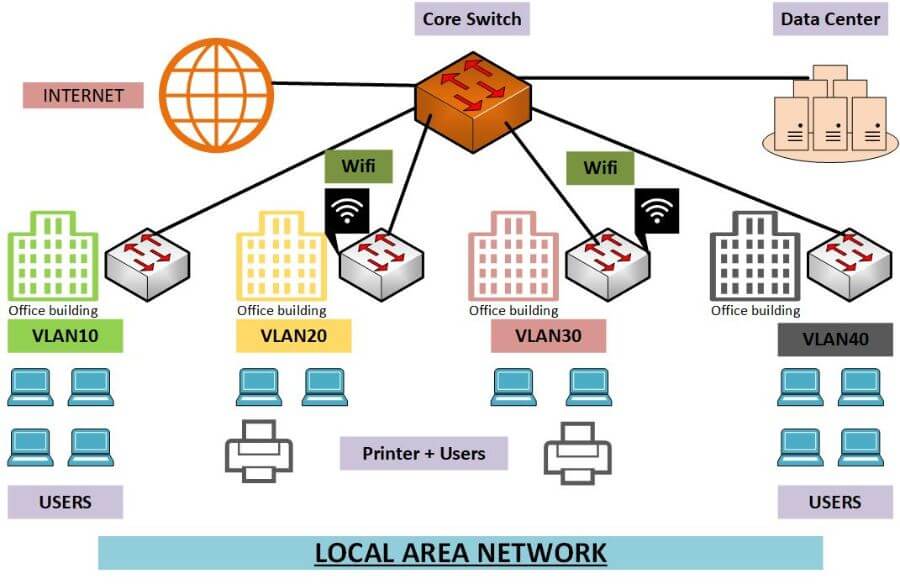
Wired and wireless Local Area Networks (LANs) serve as the backbone for most business and home networking setups. Understanding their differences is crucial for making informed decisions on which setup best suits specific needs. This discussion delves into the characteristics of wired LANs and how they stand apart from wireless LANs, focusing particularly on performance, security, and practical applications.
Characteristics of Wired and Wireless LANs
Wired LANs typically use Ethernet cables to connect devices directly to a network, providing reliable and consistent performance. They are known for their speed, with typical data transfer rates ranging from 100 Mbps to 10 Gbps depending on cable type. In contrast, wireless LANs utilize radio waves to connect devices, offering greater flexibility and mobility but often at the cost of speed and reliability.
Performance can vary significantly between the two types of networks. Wired networks generally experience lower latency and reduced interference compared to wireless networks, which can be impacted by physical barriers, distance, and other electronic devices. Security is another area where wired LANs excel; data transmitted over cables is much harder to intercept compared to wireless signals, which can be vulnerable to eavesdropping without proper encryption.
Advantages and Disadvantages of Each Type of LAN Setup
When considering a LAN setup, both wired and wireless options come with their advantages and disadvantages. Understanding these can help determine the most appropriate choice for different scenarios.
- Wired LAN Advantages:
- High-speed connections with consistent performance.
- Enhanced security through physical connections.
- Lower latency and reduced interference.
- Wired LAN Disadvantages:
- Limited mobility for connected devices.
- Higher installation costs due to cabling.
- Complexity in setup and maintenance.
- Wireless LAN Advantages:
- Greater mobility and ease of access for devices.
- Lower installation costs without the need for extensive cabling.
- Flexible setups that can be easily reconfigured.
- Wireless LAN Disadvantages:
- Potential for slower speeds and higher latency.
- Vulnerability to security breaches if not properly secured.
- Interference from other wireless devices and physical barriers.
Preferred Scenarios for Each Type of LAN
Different scenarios may dictate a preference for either wired or wireless LAN setups. For instance, in environments where high bandwidth and low latency are critical, such as data centers or gaming setups, wired networks are typically favored. The stability they provide is essential for activities that demand consistent performance.
On the other hand, settings like cafes, offices with flexible workspaces, or homes with numerous mobile devices often benefit from wireless LANs. The convenience of connecting devices without the clutter of cables enhances user experience, especially in environments where users frequently move around.
“Choosing between wired and wireless LANs ultimately depends on the specific needs of the environment and the types of activities that will dominate network usage.”
Analyzing the key protocols utilized in Local Area Networks
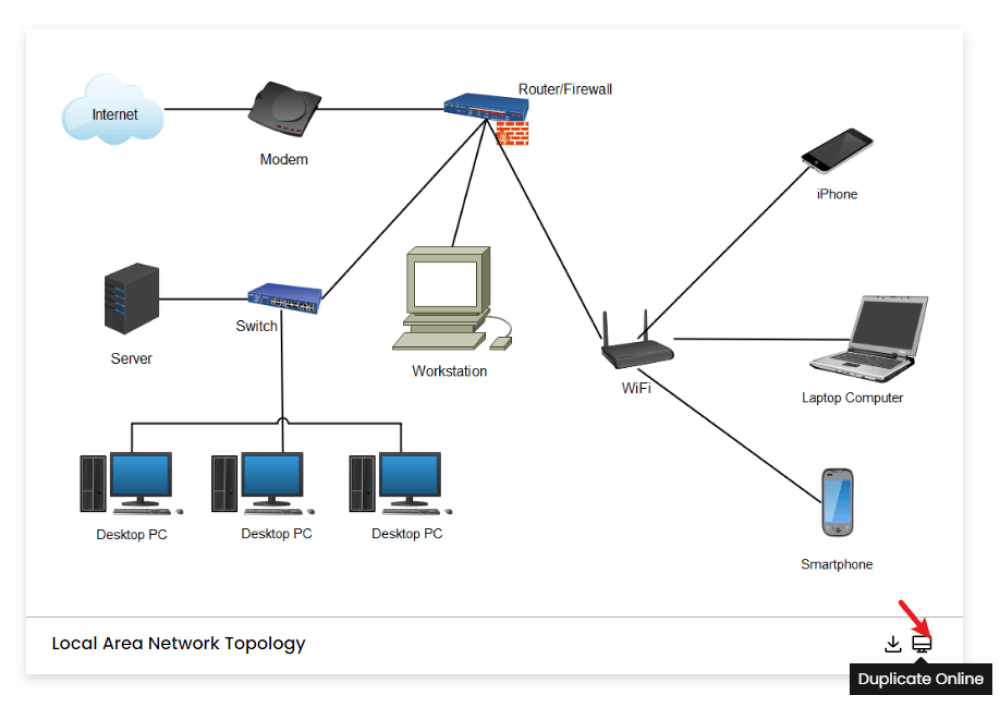
Local Area Networks (LANs) rely on various protocols to facilitate communication between connected devices. These protocols are essential for managing how data is transmitted, ensuring reliability, and maintaining the integrity of the information being exchanged. Understanding these key protocols can help in designing efficient networks and troubleshooting connectivity issues.
The primary networking protocols commonly used in LANs include Ethernet and Wi-Fi. Each of these protocols plays a significant role in enabling devices to communicate effectively, whether through wired or wireless connections. Ethernet, primarily used for wired connections, operates on a set of standards defined by the IEEE 802.3. It ensures that data packets are transmitted accurately and efficiently over the network. On the other hand, Wi-Fi, governed by the IEEE 802.11 standards, facilitates wireless communication, providing flexibility and mobility for users. Both protocols are critical in delivering high-speed data transfer, managing network traffic, and ensuring data integrity.
Key Protocols in Local Area Networks
The following are key protocols that are instrumental in LAN operations. Each protocol serves a specific function and comes with unique features that cater to different networking needs.
- Ethernet: The foundation of most wired LANs, Ethernet technology allows devices to communicate over a physical medium using frames. It is known for its reliability and speed, with various standards available, including Fast Ethernet (100 Mbps) and Gigabit Ethernet (1 Gbps).
- Wi-Fi: A wireless networking protocol that enables devices to connect to the LAN without physical cables. Wi-Fi has evolved through various standards, including 802.11n, 802.11ac, and the latest, 802.11ax (Wi-Fi 6), providing faster speeds and improved capacity for multiple users.
Comparison of Features
To better understand the differences between Ethernet and Wi-Fi protocols, the following table summarizes their key features:
| Feature | Ethernet | Wi-Fi |
|---|---|---|
| Connection Type | Wired | Wireless |
| Speed | Up to 10 Gbps (depending on the standard) | Up to 9.6 Gbps (Wi-Fi 6) |
| Range | Limited to cable length (typically 100 meters) | Varies (up to 30 meters indoors, more outdoors) |
| Interference | Minimal interference, less susceptible to signal loss | Can be affected by physical obstacles and other wireless signals |
| Setup Complexity | Requires cabling and network hardware | More convenient, requiring only wireless access points |
Understanding the distinctions and functionalities of Ethernet and Wi-Fi is crucial for optimizing network performance and meeting user requirements.
Investigating the security measures essential for Local Area Networks
Security in Local Area Networks (LANs) is an essential aspect of maintaining the integrity and availability of network resources. As organizations increasingly rely on interconnected systems, the vulnerabilities associated with LANs become more pronounced. A clear understanding of the potential security threats and the measures necessary to mitigate them is crucial for ensuring a robust and secure network environment that protects sensitive data and resources.
Numerous security threats can affect Local Area Networks, ranging from unauthorized access to malware infections. These threats can severely compromise network integrity and disrupt operations. The impacts of such threats may include data breaches, loss of confidential information, and diminished productivity due to system downtime. Understanding these threats is the first step in establishing a strong defense.
Common security threats to Local Area Networks
The security threats that can affect LANs are varied and increasingly sophisticated. Some of the most common threats include:
- Unauthorized Access: Intruders gaining access to the network can lead to significant data breaches and loss of sensitive information.
- Malware: Viruses, worms, and ransomware can infect network devices, causing data corruption and financial loss.
- Man-in-the-Middle Attacks: Interceptors can capture and manipulate data being transmitted over the network.
- Denial of Service (DoS) Attacks: Attackers can overwhelm network devices, rendering them unavailable to legitimate users.
- Insider Threats: Employees with malicious intent or those who inadvertently compromise security can pose significant risks.
The impacts of these threats include data loss, financial repercussions, and damage to an organization’s reputation. Thus, it is crucial to implement effective security measures to protect against these vulnerabilities.
Security protocols and practices for Local Area Networks
To safeguard a Local Area Network, various security protocols and practices can be employed. These measures create layers of defense that help protect against unauthorized access and other threats.
Some effective security protocols include:
- WPA3 (Wi-Fi Protected Access 3): This is the latest security protocol for Wi-Fi networks that offers enhanced encryption and protection against brute-force attacks.
- IPSec (Internet Protocol Security): This protocol secures network communications by encrypting IP packets and providing authentication.
- 802.1X Authentication: This protocol provides an authentication mechanism to devices wishing to connect to a LAN, ensuring that only authorized users can access the network.
In addition to these protocols, implementing best practices can significantly enhance LAN security.
Best practices for securing a Local Area Network
Adopting best practices is essential for maintaining the security of a LAN. The following guidelines help strengthen defenses against potential threats:
- Regularly update software and firmware to patch vulnerabilities and improve security features.
- Implement strong password policies to ensure that access credentials are difficult to guess or crack.
- Utilize network segmentation to isolate sensitive data and limit access to critical resources.
- Deploy firewalls to monitor and control incoming and outgoing network traffic.
- Conduct regular security audits and assessments to identify and address potential vulnerabilities.
- Educate employees about security awareness and best practices to mitigate risks associated with human error.
By systematically addressing these security measures, organizations can significantly reduce the risks associated with Local Area Networks, ensuring that their data and resources remain secure.
Evaluating the role of Local Area Networks in modern business environments
Local Area Networks (LANs) play an essential role in the operational efficiency of modern businesses. By facilitating effective communication and resource sharing, LANs help organizations streamline workflows and enhance productivity. In today’s fast-paced business environment, where collaboration and speed are paramount, the integration of LANs has become a strategic necessity for enterprises of all sizes.
LANs support organizational operations by enabling seamless access to shared resources. This includes file servers, printers, and internet connections, which can substantially reduce operational costs and time. The infrastructure provided by LANs allows employees to share large files, communicate effortlessly, and utilize central applications that bolster productivity. Shared resources foster a collaborative atmosphere where team members can work together effectively, regardless of their physical location within the office.
Impact of LANs on employee collaboration
Collaboration among employees is significantly enhanced through the implementation of Local Area Networks. The ability to connect multiple devices within a localized geographic area promotes interaction and teamwork. Here are some key aspects of how LANs improve collaboration:
- Real-time communication: LANs enable instant messaging and video conferencing tools, allowing employees to connect and share ideas quickly.
- File sharing: Using shared drives or cloud services, teams can easily access and edit documents simultaneously, fostering a cooperative working environment.
- Centralized applications: Business applications hosted on a LAN can serve multiple users, ensuring that everyone has access to the same tools and information, which reduces redundancy and discrepancies.
- Increased accessibility: Employees can access the network from different devices, whether desktops or laptops, enhancing their ability to collaborate on projects anytime, anywhere.
The integration of LANs into business operations has also led to the proliferation of various applications that rely heavily on this network structure. Examples include:
- Enterprise Resource Planning (ERP) systems: These systems depend on a LAN to facilitate the sharing of data across departments, such as finance, HR, and supply chain management.
- Customer Relationship Management (CRM) software: CRMs utilize LANs to allow sales and customer service teams to access customer information and history efficiently.
- Collaboration platforms: Tools like Microsoft Teams or Slack function optimally over LANs, enabling teams to communicate and collaborate in real-time.
- Virtual Private Networks (VPNs): Employees can securely access the company’s LAN remotely, ensuring that collaboration continues even outside the office environment.
The reliance on LANs for these applications underscores their importance in fostering an environment where productivity can thrive and innovation can be encouraged.
Designing a simple Local Area Network for a small office
Establishing a Local Area Network (LAN) in a small office is essential for facilitating communication and data sharing among devices. A well-designed LAN enhances productivity, ensures efficient resource management, and improves the overall workflow. The process involves several critical steps, from planning and designing to implementing the hardware and ensuring network layout meets the office’s specific needs.
To plan and establish a functional LAN in a small office, follow these steps:
1. Assess Current and Future Needs: Identify the number of devices that will connect to the network, such as computers, printers, and other peripherals. Consider future growth to ensure the network can accommodate additional devices.
2. Determine Network Layout: Decide on a layout that optimizes performance and provides adequate coverage. Consider whether a star topology, where each device connects to a central hub, is best for the office size.
When selecting appropriate hardware and designing the layout for the network, it’s crucial to consider:
– Network Speed and Performance: Choose routers and switches that support high-speed connections, ideally at least 1 Gbps for a modern office environment.
– Device Compatibility: Ensure all hardware is compatible with existing devices and software.
– Scalability: Opt for equipment that can handle increased loads and additional devices as the office grows.
Hardware Selection and Layout Design
Selecting the right hardware is vital for ensuring a reliable and efficient network. The following components will typically be included in a small office LAN setup:
– Router: Acts as the gateway to the internet and manages traffic between the local network and external networks.
– Switch: Connects multiple devices on the LAN, allowing them to communicate with each other.
– Access Points: Extend the network coverage, especially in larger office spaces or areas with obstacles.
– Network Cables: Use CAT6 or higher for wired connections to ensure high-speed data transfer.
The layout of the LAN should be designed with physical space and device placement in mind. Here’s a simple illustration of a LAN setup in a small office:
“`
[Router]
|
[Switch]——[PC1]
| |
[Access Point]–[PC2]
| |
[Printer]—–[Laptop]
“`
– Router: Connects to the internet and manages device traffic.
– Switch: Facilitates communication between connected devices like PC1 and PC2.
– Access Point: Provides wireless connectivity for devices like laptops and mobile devices.
– Printer: Connected to the switch, allowing all users to print without needing direct connections to each device.
This setup maximizes efficiency and ensures that all devices have a reliable connection to both each other and the internet, promoting seamless operational capabilities.
“An effectively designed LAN not only enhances productivity but also supports future growth and technology integration.”
Examining the future trends in Local Area Network technology
As we look towards the next decade, the landscape of Local Area Network (LAN) technology is set to evolve dramatically. With the rise of new advancements and demands in network capabilities, the future of LANs will be heavily influenced by emerging technologies that enhance speed, capacity, and security. Understanding these trends is crucial for businesses and individuals who rely on efficient network systems.
The integration of innovative technologies will significantly shape the evolution of LANs. Among these, the introduction of Wi-Fi 6 and the upcoming Wi-Fi 6E will boost wireless capabilities, offering higher speeds and better performance in dense environments. Additionally, advancements in fiber optics will enable LANs to achieve unprecedented data transfer rates, allowing for higher capacity and more reliable connections. The increasing need for security in network infrastructures will also lead to the implementation of more robust encryption methods and improved traffic management systems.
Emerging Technologies Influencing LAN Evolution
The following technologies are anticipated to have a substantial impact on the development of Local Area Networks over the coming years:
- Wi-Fi 6 and Wi-Fi 6E: These technologies offer increased bandwidth and efficiency, supporting more devices without compromising performance. They utilize advanced features like Orthogonal Frequency Division Multiple Access (OFDMA) to reduce latency and enhance user experience.
- Software-Defined Networking (SDN): SDN provides dynamic management of network resources, allowing administrators to optimize and adjust the network’s performance based on real-time data. This adaptability is essential for handling the growing number of connected devices.
- Network Function Virtualization (NFV): NFV decouples network functions from hardware, allowing for more flexible and scalable network designs. This technology enables easier deployment of new services and applications in LAN environments.
- 5G Integration: The rollout of 5G technology is expected to significantly enhance LAN capabilities, particularly in terms of speed and latency. The synergy between 5G and Wi-Fi networks will create hybrid systems that maximize performance and user experience.
- Edge Computing: By processing data closer to the source, edge computing reduces latency and bandwidth usage, allowing Local Area Networks to handle IoT devices more efficiently. This is vital as the number of connected devices continues to rise.
Advancements in Speed, Capacity, and Security
Future LAN configurations will prioritize improvements in speed, capacity, and security. As data demands escalate, networks will need to expand their capabilities to accommodate a myriad of devices and applications.
For speed, advancements such as multi-gigabit Ethernet will enable LANs to support higher data rates, paving the way for faster file transfers and reduced buffering in applications like video conferencing. In terms of capacity, the integration of higher-bandwidth technologies will ensure that networks can handle a significant number of simultaneous connections without degradation of performance.
Security remains a top concern in the evolution of LANs. Enhanced authentication protocols, such as Zero Trust security models, will play a critical role in safeguarding network integrity. As cyber threats become more sophisticated, LANs will need to adopt adaptive security measures that respond to potential vulnerabilities in real time.
Integration of IoT Devices within Local Area Networks
The rise of the Internet of Things (IoT) is set to transform how Local Area Networks operate. The proliferation of IoT devices will necessitate LANs to support a diverse range of applications, from smart home technology to industrial automation.
With millions of devices expected to connect to networks, it is essential for LANs to implement technologies that can efficiently manage this influx. Features such as automated device discovery and network segmentation will help maintain performance and security.
As an example, the deployment of smart sensors in manufacturing environments demonstrates how LANs can integrate IoT devices to optimize operations. By providing real-time data on equipment status and environmental conditions, these sensors enable proactive maintenance and improved resource management.
In summary, as Local Area Networks continue to evolve, the influence of emerging technologies, enhanced capabilities, and the integration of IoT devices will play pivotal roles in shaping the future of connectivity.
Final Summary
In summary, Local Area Networks (LANs) are pivotal in creating efficient and productive environments for both personal and professional use. As technology continues to evolve, so too will the capabilities and applications of LANs, opening up new avenues for connectivity and collaboration. By understanding their components, protocols, and security challenges, businesses and individuals can harness the full potential of LANs to meet their networking needs.
FAQ Insights
What is the main purpose of a Local Area Network (LAN)?
The main purpose of a LAN is to connect devices within a limited area, allowing for resource sharing and communication among users.
How does a wired LAN compare to a wireless LAN in terms of speed?
A wired LAN generally provides faster speeds and more stable connections compared to a wireless LAN, which can be affected by interference and distance.
What are common security threats to LANs?
Common threats include unauthorized access, malware attacks, and data breaches that can compromise network integrity.
What is the role of protocols like Ethernet in a LAN?
Protocols like Ethernet define the rules for data transmission, ensuring effective communication and maintaining data integrity across the network.
Can a LAN support IoT devices?
Yes, LANs can support IoT devices, enabling smart home technologies and connected devices to communicate within the network.