Kicking off with Human-Computer Interaction (HCI), this fascinating field explores the intricate relationship between humans and computers, highlighting the ways in which technology can be designed to enhance user experience. From its historical roots to modern applications, HCI is at the forefront of designing systems that are not only functional but also intuitive and enjoyable for users.
The core principles of HCI revolve around understanding user needs, usability testing, and the cognitive processes that influence how we interact with technology. By prioritizing user-centered design, HCI aims to create more accessible and meaningful interactions through innovative interface designs and emerging technologies.
Understanding the Fundamental Principles of Human-Computer Interaction
Human-Computer Interaction (HCI) is an interdisciplinary field that focuses on the design and use of computer technology, emphasizing the interfaces between people (users) and computers. The significance of HCI is underscored by its impact on the usability and functionality of systems that we encounter in daily life, ranging from smartphones to complex software applications. In this exploration, we will delve into the historical roots of HCI, the theoretical frameworks that shape its research and practice, and the critical role of user-centered design.
Historical Context and Origins of HCI
HCI’s origins can be traced back to the early days of computing in the 1960s and 1970s when researchers began to recognize the need for more user-friendly computer systems. Early contributions came from cognitive psychology, which informed how users interact with machines based on their mental processes. One pivotal moment was Douglas Engelbart’s 1968 demonstration of the computer mouse and graphical user interface (GUI) at the “Mother of All Demos.” This event marked a significant shift towards integrating human needs into computing design.
During the 1980s, the field began to formalize, influenced by the rise of personal computing. The introduction of user-friendly interfaces, like Apple’s Macintosh GUI, made computers accessible to a broader audience. Researchers began to develop principles and guidelines for interaction design, leading to the establishment of HCI as a distinct academic discipline. In the following decades, the emergence of the internet and mobile technology further expanded the scope of HCI, prompting new research into web usability and mobile interfaces.
HCI has since evolved to encompass a variety of domains, including virtual reality, ubiquitous computing, and social computing. Today, it continues to adapt to rapid technological changes, aiming to enhance the interaction between humans and an ever-growing range of devices.
Theories and Frameworks Guiding HCI
The theoretical foundation of HCI is built upon several key frameworks that inform both research and practice. Prominent among these are:
- Cognitive Load Theory: This framework examines how cognitive resources are utilized during interaction, stressing the importance of minimizing cognitive load to enhance user experience.
- Activity Theory: Originating from psychology, this theory focuses on understanding human activity in context, emphasizing the role social and cultural factors play in shaping user interactions.
- Norman’s Design Principles: Donald Norman proposed essential principles for user-centered design, including visibility, feedback, and consistency, which guide effective interface design.
These frameworks facilitate the development of user-centered systems, which prioritize usability and accessibility, ultimately improving user satisfaction and productivity.
Significance of User-Centered Design
User-centered design (UCD) is a foundational principle in HCI, emphasizing the importance of involving users throughout the design process. This approach ensures that systems are tailored to meet the actual needs and preferences of users, leading to more intuitive and effective interactions. UCD incorporates user feedback at various stages, resulting in iterative design improvements based on real-world testing.
The significance of UCD is evident in various sectors, such as healthcare, where well-designed interfaces can lead to better patient outcomes. For instance, electronic health records (EHR) systems that prioritize user input and usability have been shown to reduce errors and improve clinician efficiency. Additionally, in consumer software, applications that incorporate UCD principles often lead to increased user engagement and retention.
In summary, HCI’s historical development, foundational theories, and emphasis on user-centered design are crucial to creating systems that enhance user interaction and satisfaction.
The Role of Usability Testing in Human-Computer Interaction
Usability testing plays a critical role in ensuring that products meet user needs and expectations. It involves evaluating a product by testing it with real users, allowing designers and developers to identify areas for improvement. This process helps to enhance the overall user experience, making technology more accessible and effective.
Usability testing encompasses a variety of methodologies and processes designed to gather insights on how users interact with a system. Typically, it starts with defining clear objectives and selecting representative users. The test environment can vary from a controlled lab setting to remote testing, depending on the objectives and resources available. Observers take notes on user behavior, often supplemented by metrics such as task completion rates and time taken to complete tasks. This approach allows for a comprehensive understanding of user difficulties and satisfaction levels.
Methodologies and Processes for Usability Testing
Several methodologies are employed in usability testing, each with its specific focus and techniques. Here are some key methodologies often utilized:
- Moderated Usability Testing: In this method, a facilitator guides users through tasks while observing their interactions. This allows for immediate feedback and clarifications.
- Unmoderated Usability Testing: Users complete tasks independently, often in their own environments. This method tends to provide organic insights but lacks real-time observation.
- A/B Testing: This technique compares two versions of a product to see which one performs better in terms of user engagement and satisfaction.
- Remote Usability Testing: Conducted online, this approach allows users to participate from various locations, providing a broader perspective on usability.
The choice of methodology depends on factors like the product stage, available resources, and specific objectives. For instance, moderated tests are ideal during early design stages to gather in-depth insights, while A/B testing is useful for optimizing existing features.
Usability Testing Techniques and Applications
Different usability testing techniques serve distinct applications across diverse platforms. Here are some examples:
- Think-Aloud Protocol: Participants verbalize their thoughts while performing tasks, offering insights into their decision-making processes and potential pain points.
- Eye-Tracking: This technique monitors where users look on a screen, revealing areas of interest and confusion. Eye-tracking data can inform design adjustments to enhance visual hierarchy.
- Card Sorting: Users organize content into categories that make sense to them, helping designers understand how to structure information in a way that aligns with user expectations.
These techniques are applicable in various settings, from web applications to mobile interfaces, ensuring that products are intuitive and user-friendly.
Impact of Usability Testing on Product Development and User Satisfaction
The impact of usability testing on product development is profound. By identifying usability issues early, teams can make informed design decisions that lead to improved functionality and user satisfaction.
“Usability testing reduces the risk of product failure and enhances user engagement by ensuring that users can easily navigate and interact with systems.”
For example, a well-known e-commerce platform implemented usability testing and discovered that simplifying the checkout process led to a 30% increase in conversions. This demonstrates how targeted improvements based on user feedback can drive business success.
Additionally, continuous usability testing throughout the product lifecycle fosters a culture of user-centered design, ultimately contributing to higher levels of user satisfaction and loyalty. As technology evolves, integrating usability testing as a standard practice ensures that products remain relevant and effective in meeting user needs.
Exploring Interaction Design and Its Relevance to HCI
Interaction design plays a crucial role in the realm of Human-Computer Interaction (HCI), as it centers around creating meaningful and effective interactions between users and digital interfaces. A well-executed interaction design not only enhances usability but also enriches the overall user experience, making it an essential aspect for designers to focus on when developing systems or applications.
Key elements of interaction design encompass various factors that significantly influence user experience. These include usability, accessibility, aesthetics, and contextuality. Each element contributes to how users perceive and interact with a digital product. For instance, usability ensures that users can navigate through an interface effectively, while aesthetics can create a visually pleasing experience that draws users in. Accessibility ensures that products cater to users with varying abilities, and contextuality involves adapting the design based on the user’s situation and needs.
Key Elements of Interaction Design
Understanding the fundamental elements of interaction design is essential for creating interfaces that resonate with users. The following points highlight these key components:
- Usability: This element ensures that products are easy to use and intuitive, minimizing the learning curve for users. A good example is the design of smartphone interfaces, which allow users to quickly access apps and features.
- Accessibility: An inclusive design approach makes products usable for everyone, including people with disabilities. Websites that incorporate screen readers and keyboard navigation exemplify this principle.
- Aesthetics: Visual appeal can greatly influence user engagement. Well-designed apps with harmonious color schemes and attractive layouts invite users to explore further.
- Contextuality: Recognizing the user’s context helps in tailoring the interaction experience. For example, location-aware applications provide relevant information based on a user’s physical location.
Approaches to Interaction Design
Interaction design incorporates various approaches that cater to both physical and digital interfaces. The distinction between these two can shape how users interact with technology in their daily lives.
- Physical Interfaces: These involve tangible objects that users manipulate. An example would be a smart thermostat with dials and buttons that users can physically touch to adjust settings.
- Digital Interfaces: These are virtual spaces where users engage through screens and touch inputs. Mobile applications and websites serve as prime examples, where interaction is achieved through clicks, swipes, and keypresses.
- Mixed Interfaces: The blending of physical and digital elements creates hybrid experiences. Augmented reality applications that project digital information onto the real world are a contemporary example that illustrates the convergence of both types.
Importance of Prototyping in Interaction Design
Prototyping is a vital step in the interaction design process, allowing designers to visualize and test their ideas before full-scale implementation. By creating prototypes, designers can gather feedback, identify potential usability issues, and refine their designs effectively.
The prototyping phase can vary in fidelity, ranging from low-fidelity sketches and wireframes to high-fidelity interactive models. Each prototype serves a distinct purpose, helping stakeholders visualize the interface and experience.
“Prototyping not only saves time and resources but also fosters collaboration among team members and stakeholders, ensuring that the final product aligns with user needs.”
Engaging users during this process is also important, as their input can lead to insights that might not have been considered initially. This iterative approach enhances the overall user experience, ultimately resulting in a more successful product. Prototypes are also instrumental in communicating design concepts to developers and other stakeholders, ensuring that everyone involved has a clear understanding of the intended user experience.
The Influence of Cognitive Psychology on Human-Computer Interaction
Cognitive psychology significantly shapes the design and usability of interfaces, guiding how users interact with technology. Understanding cognitive processes such as perception, memory, and attention is crucial for creating intuitive and efficient user experiences. By applying these principles, designers can enhance usability and improve the overall user experience, leading to more satisfying interactions with technology.
Cognitive psychology principles inform HCI design practices by emphasizing how users process information and make decisions. Design elements such as layout, color schemes, and navigation structures are all influenced by cognitive theories. For instance, the Gestalt principles of perception help designers create interfaces that users can quickly understand and navigate, as they leverage natural tendencies for grouping and pattern recognition. Additionally, the theory of affordances informs how users perceive the function of interface elements, allowing designers to create more intuitive interactions that feel natural.
Mental Models and User Interaction
Mental models play a vital role in shaping user interactions with technology. Users form mental representations of how systems work based on their past experiences and knowledge, which greatly influences their expectations and behaviors when interacting with interfaces. Designers must consider these mental models to create systems that align with user expectations.
When users engage with a technology, they often rely on their mental models to predict outcomes and actions. Understanding this concept is essential for HCI as it affects how users interpret system feedback and adjust their strategies. Here are several key aspects of mental models in HCI:
- Consistency: Maintaining consistency within the interface helps users build accurate mental models, as they can rely on familiar patterns and responses.
- Feedback: Providing clear feedback allows users to adjust their mental models based on their interactions, reinforcing their understanding of how the system operates.
- Mapping: Logical mappings between actions and results help users form accurate mental models, as they can easily associate their inputs with the corresponding system responses.
- Affordances: Clearly defined affordances assist users in understanding the functions of interface elements, promoting effective interactions and reducing errors.
The effectiveness of a system can be significantly enhanced by aligning its design with the users’ mental models, leading to improved satisfaction and performance.
Understanding how users process information has profound implications for HCI. Cognitive load, which refers to the amount of mental effort required to perform a task, is crucial in determining how efficiently users can interact with technology. High cognitive load can lead to errors and frustration. Therefore, effective HCI design should aim to minimize cognitive load by simplifying tasks and presenting information in digestible chunks.
Effective information processing strategies can be implemented in HCI design through the following methods:
- Chunking: Breaking down complex information into smaller, manageable units helps users retain and process information more effectively.
- Visual Hierarchy: Utilizing visual hierarchy to prioritize information guides users’ attention to the most important elements first.
- Progressive Disclosure: Revealing information progressively allows users to focus on immediate tasks without feeling overwhelmed by excessive details.
- Clear Navigation: Intuitive navigation structures help users quickly find the information they need, enhancing their ability to process and interact with technology efficiently.
By applying cognitive psychology principles, HCI can create more user-friendly interfaces that align with users’ natural thinking patterns, ultimately improving their overall experience with technology.
The Impact of Emerging Technologies on Human-Computer Interaction
Emerging technologies such as virtual reality (VR), augmented reality (AR), and artificial intelligence (AI) are revolutionizing the way users interact with computers. As these technologies evolve, they create new opportunities for immersive experiences and personalized engagements that fundamentally alter the user experience landscape. Understanding their impact on human-computer interaction (HCI) is crucial for designers, developers, and researchers alike.
The integration of VR, AR, and AI into HCI enables richer, more intuitive interactions, allowing users to engage with digital content in ways that were previously unimaginable. These technologies provide new modalities of interaction, such as gesture recognition, spatial awareness, and adaptive experiences based on user behavior. However, this also presents challenges, such as ensuring accessibility for all users and managing the cognitive load placed on individuals during interactions.
Technologies Transforming HCI
The advent of VR and AR technologies has transformed traditional interfaces, creating engaging environments where users can interact with digital content in three-dimensional spaces. These technologies enhance user engagement through immersive experiences, providing a sense of presence that traditional interfaces cannot offer. Examples include:
- Virtual Reality Training Simulations: Industries like aviation and healthcare utilize VR for training purposes, allowing users to practice skills in a safe, controlled environment. For instance, flight simulators enable pilots to experience real-life scenarios without the risk associated with actual flying.
- Augmented Reality Navigation: AR applications enhance navigation systems by overlaying digital information onto the real world. A notable example is Google Maps’ Live View, which uses AR to guide users with directional arrows and points of interest highlighted in their actual surroundings.
Artificial Intelligence also plays a pivotal role in HCI by enabling systems to learn from user interactions and adapt accordingly. AI enhances user engagement by personalizing experiences, making interfaces more intuitive and responsive. Some applications include:
- Smart Assistants: AI-driven assistants like Siri and Alexa use natural language processing to understand and respond to user commands, making technology more accessible and user-friendly.
- Recommendation Systems: Platforms like Netflix and Spotify utilize AI algorithms to analyze user preferences and behavior, providing personalized content recommendations that enhance the user experience.
“The integration of VR and AI in HCI not only improves usability but also opens up new frontiers for collaborative experiences.”
These emerging technologies present both challenges and opportunities for enhancing user engagement. While they offer innovative methods of interaction, they also require careful consideration of user experience design principles to ensure that all users can benefit from these advancements. As we continue to explore the potential of VR, AR, and AI, the trajectory of HCI will be shaped by our ability to harness these technologies effectively while addressing the needs of diverse user groups.
The Importance of Accessibility in Human-Computer Interaction
Accessibility in Human-Computer Interaction (HCI) is a fundamental aspect that ensures all users, regardless of their abilities or disabilities, can effectively engage with technology. The principles of accessible design not only enhance user experience but also promote inclusivity in digital environments. When technology is designed with accessibility in mind, it creates opportunities for a wider audience, fostering equality and participation in the digital age.
Principles of Accessible Design
Accessible design is rooted in several key principles that guide the development of inclusive technology. These principles include perceivability, operability, understandability, and robustness. Each principle plays a crucial role in ensuring that all users, including those with disabilities, can access and navigate digital content effectively.
- Perceivability: Information must be presented in ways that can be perceived by all users. This includes providing text alternatives for non-text content, using sufficient color contrast, and ensuring that audio content is accompanied by captions or transcripts.
- Operability: Users should be able to navigate interfaces and interact with elements through various means. This involves designing interfaces that can be operated by both keyboard and mouse, ensuring that all interactive elements are easily accessible.
- Understandability: Information and operations must be clear and easy to understand. This includes using straightforward language, providing instructions, and ensuring that system status and feedback are communicated effectively.
- Robustness: Content must remain accessible across various platforms and devices. This means adhering to web standards and ensuring compatibility with assistive technologies.
Strategies for Creating Inclusive User Experiences
Creating inclusive user experiences involves implementing specific strategies that cater to the diverse needs of users with disabilities. These strategies not only enhance usability but also promote a sense of belonging among all users.
- Conduct User Testing with Diverse Groups: Engaging real users, including those with disabilities, in testing phases helps identify barriers and areas for improvement, ensuring that the final product is user-friendly for everyone.
- Implement Responsive Design: Designing for multiple devices and screen sizes ensures that users can access content regardless of the technology they are using, enhancing inclusivity.
- Utilize Accessible Design Tools: Many design tools offer features to enhance accessibility, like color contrast analyzers and screen reader compatibility checks. Leveraging these tools can streamline the design process.
- Provide Training and Resources: Educating designers and developers about accessibility guidelines, such as the Web Content Accessibility Guidelines (WCAG), is essential to foster a culture of accessibility in technology development.
Legal and Ethical Implications of Accessibility
The legal and ethical landscape surrounding accessibility in technology design is significant. Various laws and regulations mandate accessibility, which emphasizes the importance of designing inclusive products.
- Compliance with Laws: In many countries, such as the United States, the Americans with Disabilities Act (ADA) requires that digital content be accessible to individuals with disabilities. Organizations must ensure their products comply with these legal requirements to avoid litigation and enhance market reach.
- Ethical Responsibility: Beyond legal compliance, there is an ethical obligation for designers and developers to create inclusive technologies. Designing for accessibility is not just a choice; it is a commitment to equity and social responsibility.
- Corporate Reputation: Companies that prioritize accessibility often experience enhanced public perception and customer loyalty. Accessible products can lead to increased user engagement and market share.
“Accessibility is not a feature, it’s a social necessity.”
Evaluating User Experience in Human-Computer Interaction
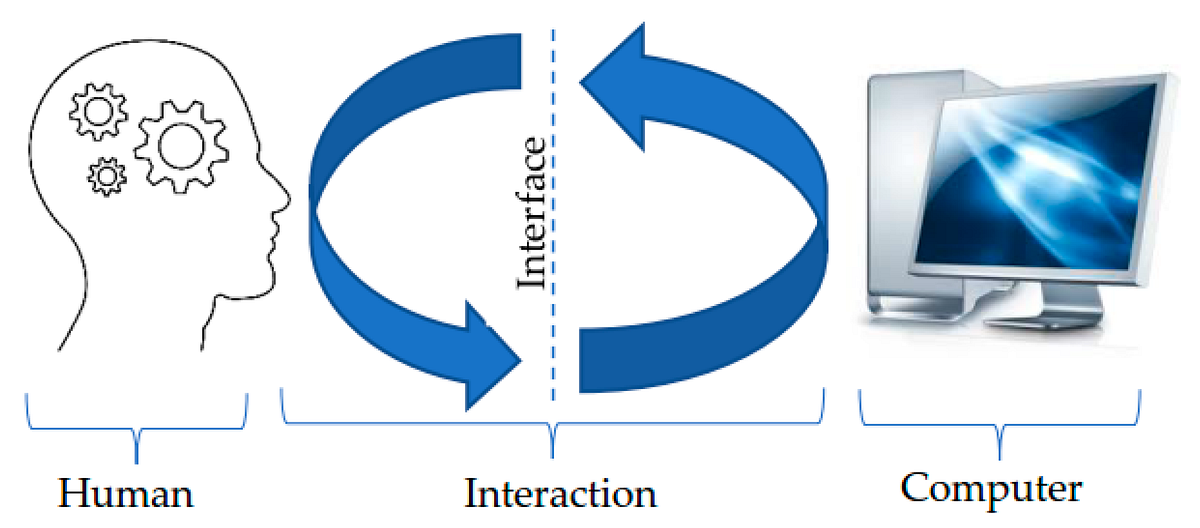
Assessing user experience (UX) is a pivotal aspect of Human-Computer Interaction (HCI) that enables designers and developers to create efficient, user-friendly systems. The evaluation process ensures that the interfaces and interactions are not only functional but also enjoyable and effective for users. Proper assessment of UX involves a variety of metrics and methodologies that help in understanding how users interact with a system and what can be improved.
Understanding key metrics and indicators for assessing user experience is fundamental in the evaluation process. These metrics provide insight into user satisfaction, usability, and overall engagement with the system. Some of the primary metrics include:
Key Metrics and Indicators
User experience can be quantified through several indicators that reflect usability and user satisfaction. The following metrics are commonly used in evaluating HCI systems:
- Satisfaction Ratings: Often measured through surveys or questionnaires, satisfaction ratings capture user’s feelings and perceptions about their experience.
- Task Success Rate: This measures the percentage of correctly completed tasks by users, indicating how effectively users can utilize the system.
- Time on Task: This metric records how long it takes a user to complete a task, which can reveal inefficiencies in the interface.
- Error Rate: Tracking the number of errors made by users during interactions helps identify areas that may require redesign or improved guidance.
- Net Promoter Score (NPS): This measures the likelihood of users recommending the system to others, providing insight into overall satisfaction and loyalty.
Collecting user feedback and analyzing behavioral patterns is essential for gaining deeper insights into user experience. Various methods can be employed to gather valuable data about how users interact with a system.
Methods for Collecting User Feedback and Analyzing User Behavior
Collecting and analyzing user feedback involves a mix of qualitative and quantitative approaches, helping to paint a comprehensive picture of user experience. The following methods are effective in this regard:
- User Surveys: Surveys can be used to gather subjective feedback directly from users regarding their experiences and satisfaction levels.
- Interviews: Conducting one-on-one interviews allows for in-depth discussions about user experiences, providing qualitative insights.
- Usability Testing: Observing users as they perform tasks can reveal difficulties they encounter, helping to identify usability issues.
- Analytics Tools: Implementing tracking tools can provide quantitative data on user interactions, such as page views, mouse clicks, and navigation paths.
- Heatmaps: Visual representations of user activity on pages illustrate where users click, scroll, and hover, shedding light on engagement patterns.
The success of HCI systems is significantly influenced by user experience. A system that meets user needs and expectations positively impacts its adoption and long-term usability.
Role of User Experience in Success of HCI Systems
User experience is a critical determinant of how well an HCI system performs in real-world scenarios. Factors contributing to this role include:
- Usability: A system that is easy to use and navigate contributes to higher user satisfaction and productivity.
- User Retention: Positive experiences lead to repeat usage, directly affecting system sustainability and success.
- Brand Loyalty: When users enjoy an interface, they are more likely to develop loyalty to the product or service, influencing overall brand perception.
- Competitive Advantage: A superior user experience can set a product apart in a crowded market, attracting more users and enhancing market share.
Understanding and evaluating user experience is not just a one-time task but an ongoing process that involves continuous improvement and adaptation to users’ evolving needs.
The Future Trends in Human-Computer Interaction
As technology continues to evolve, so does the landscape of human-computer interaction (HCI). The future of HCI is being shaped by advancements in artificial intelligence, augmented reality, and the increasing integration of digital interfaces into our daily lives. These trends are set to redefine how users interact with technology, making these interactions more intuitive and seamless.
The continued push towards more natural interactions between humans and computers is expected to have a significant impact. Technologies such as voice recognition, gesture control, and even brain-computer interfaces are becoming more prevalent, leading to enhanced user experiences. As these trends develop, they will not only influence how users engage with devices but also the design principles that govern HCI practices.
Emerging Technologies in HCI
Several emerging technologies are set to play a critical role in the future of HCI. These advancements promise to make interactions smoother and more human-like. The following technologies are particularly noteworthy:
- Artificial Intelligence: AI is being integrated into user interfaces to create personalized experiences. Chatbots and virtual assistants, powered by AI, are examples of how machines can understand and respond to human inquiries in a conversational manner.
- Augmented Reality (AR) and Virtual Reality (VR): These technologies transform the way users perceive and interact with digital content. AR overlays information onto the real world, while VR immerses users in entirely virtual environments, providing unique interaction possibilities.
- Wearable Technology: Devices like smartwatches and fitness trackers are becoming increasingly sophisticated, allowing users to interact with technology in more intimate and contextual ways. This trend is pushing HCI towards more health-focused applications.
Societal Influences on HCI Evolution
The evolution of HCI practices is heavily influenced by societal changes such as demographics, cultural norms, and the global push towards inclusivity. As society becomes more diverse, the need for HCI systems that cater to a wide range of user needs and abilities is paramount.
For instance, the aging population requires interfaces that are accessible and easy to use. Innovative designs are emerging to address these needs, ensuring that all users, regardless of age or ability, can comfortably engage with technology.
Speculative Designs and Innovations
Speculative designs in HCI often challenge the conventional norms of interaction, presenting innovative ideas that might not yet be feasible but hint at future possibilities. Notable examples include:
- Brain-Computer Interfaces (BCIs): These interfaces would allow users to control devices through brain activity. Imagine a user being able to send messages or control their environment purely through thought, revolutionizing accessibility for individuals with mobility challenges.
- Emotion Recognition Technology: Devices capable of interpreting human emotions could lead to more empathetic interfaces. For example, a virtual assistant that adjusts its tone and response based on the user’s emotional state.
- Smart Environments: Homes and offices equipped with sensors that adapt to human behavior could redefine interaction. Envision a workspace that automatically adjusts lighting and temperature based on the occupants’ preferences and actions.
“The future of HCI lies not just in advanced technology, but in understanding the human experience.”
End of Discussion

In conclusion, Human-Computer Interaction (HCI) is a dynamic and evolving field that continuously shapes the way we engage with technology. As we look toward the future, the integration of accessibility, usability, and emerging tech trends promises to further enhance user experiences, making them more inclusive and effective. Embracing these advancements will be crucial for creating a seamless interaction between humans and the technology that surrounds us.
FAQ Overview
What is the main goal of HCI?
The main goal of HCI is to improve the interaction between users and computers by making systems more usable, efficient, and enjoyable.
Why is usability testing important in HCI?
Usability testing is crucial as it helps identify potential issues in a system, ensuring that the product meets user needs and enhances their overall experience.
How do you define user-centered design?
User-centered design is an approach that prioritizes the needs and preferences of end users throughout the design process to create more effective products.
What role does cognitive psychology play in HCI?
Cognitive psychology informs HCI design by providing insights into how users think, learn, and interact with technology, influencing design choices that enhance usability.
What are some emerging technologies influencing HCI today?
Emerging technologies like virtual reality, augmented reality, and artificial intelligence are significantly changing HCI by introducing new ways for users to interact with digital environments.