Deployment marks a pivotal moment in the software development lifecycle where applications transition from development to real-world use. It’s the stage that can determine whether a project thrives or falters, making it crucial for developers and businesses alike. The process not only involves delivering software but also ensuring that it functions seamlessly for users while addressing potential pitfalls.
As we delve deeper into the nuances of deployment, we’ll explore its significance, the various methods employed, the role of automation, and best practices that can streamline this often complicated process. From the impact of cloud computing to future trends, you’ll gain insights that can enhance your approach to deployment and ultimately lead to more successful outcomes.
The significance of deployment in software development
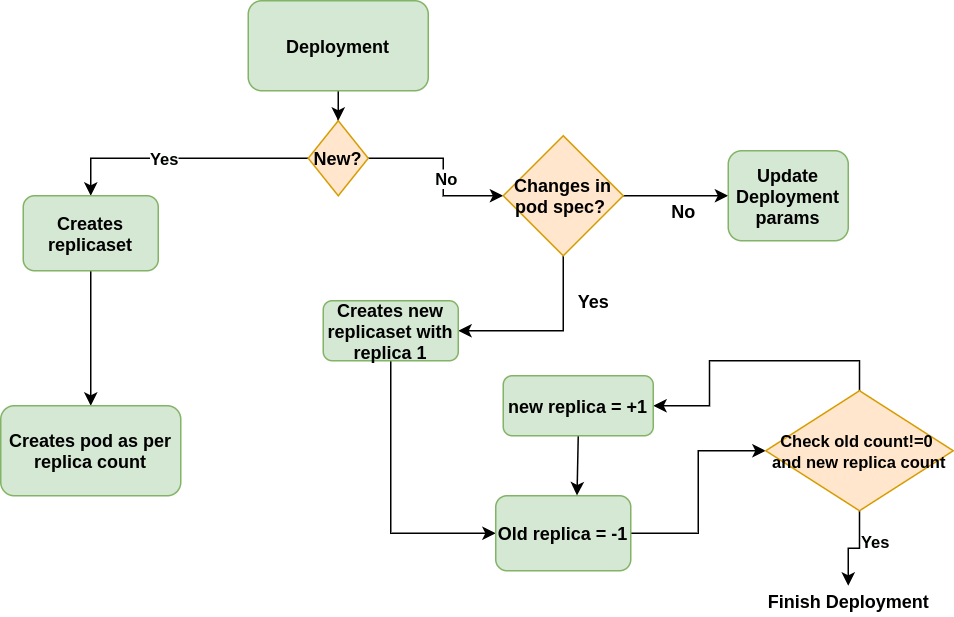
Deployment is a pivotal phase in the software development lifecycle (SDLC) that determines the success of a project. It involves making the software application available for use in a production environment, ensuring that end users can access and benefit from the features and functionalities developed during earlier phases. The way deployment is managed can significantly affect the overall performance, user satisfaction, and operational efficiency of the software, making it a crucial step in delivering valuable solutions to stakeholders.
The deployment process consists of several stages that collectively contribute to the functionality and reliability of the software. Each stage is designed to address specific aspects of the rollout, ensuring a smooth transition from development to operational use. These stages typically include planning, preparation, testing, release, and monitoring. A meticulous approach to each stage can mitigate risks and enhance the performance of the deployment.
Stages of the deployment process
The deployment process is structured into clear stages, each serving a distinct purpose. Understanding these stages is essential for achieving a successful deployment.
- Planning: This initial stage involves defining the deployment strategy, setting objectives, and preparing the necessary resources. A well-thought-out plan helps identify potential challenges and allocate resources effectively.
- Preparation: During preparation, the environment is configured, and necessary tools are set up. This ensures that the infrastructure is ready to support the application and that all components are in place for a successful launch.
- Testing: Comprehensive testing is crucial before deployment. This includes unit testing, integration testing, and user acceptance testing (UAT) to ensure that the application functions correctly and meets user requirements.
- Release: The release stage involves deploying the software to the production environment. This may be done in phases or as a full rollout, depending on the deployment strategy chosen.
- Monitoring: Post-deployment monitoring is vital for tracking the performance of the application in real-time. This stage helps identify any issues that may arise after the software is live, allowing for quick resolutions to maintain user satisfaction.
Challenges faced during deployment
While deployment is essential, it is fraught with challenges that can hinder project success. Identifying these challenges allows teams to implement effective strategies to mitigate them.
- Integration issues: Applications may face compatibility problems with existing systems. To address this, teams should conduct thorough integration testing and create a detailed compatibility matrix before deployment.
- Downtime risks: The risk of downtime during deployment can disrupt business operations. Utilizing blue-green deployments or canary releases can help minimize downtime and ensure a seamless transition.
- User resistance: Users may be resistant to changes in their workflow. Engaging users early in the process and providing training can help ease the transition and foster acceptance.
- Data migration challenges: Migrating data to the new system can be complex and prone to errors. Implementing a robust data migration plan and conducting audits post-migration is critical for data integrity.
“Successful deployment is not just about launching software; it’s about delivering a solution that meets user needs and drives business value.”
Different types of deployment methods used in technology
In the rapidly evolving landscape of technology, deployment methods play a crucial role in how software is delivered to users. Companies must choose the right approach to ensure seamless updates, minimal downtime, and optimal user experience. Understanding the various types of deployment methods is essential for any technology team aiming for efficiency and reliability.
Deployment methods vary in their strategies and implementation, providing distinct advantages and challenges. Key methods include continuous deployment, blue-green deployment, and canary deployment. Each method caters to different operational needs and organizational goals, making it vital to assess their effectiveness based on specific scenarios and contexts.
Continuous Deployment
Continuous deployment is a strategy where code changes are automatically deployed to production after passing through testing stages. This approach aims to reduce the time between writing code and releasing it to users, promoting a faster feedback loop.
– Advantages:
– Rapid delivery of new features to users.
– Continuous feedback from users helps in improving the software.
– Minimizes human error since deployments are automated.
– Disadvantages:
– Requires a robust testing framework to ensure quality.
– Potential for introducing bugs into production if tests fail to catch issues.
– May lead to overwhelming users with frequent changes.
Successful companies like Facebook and Netflix have effectively implemented continuous deployment. For instance, Netflix deploys hundreds of code changes daily, enabling them to respond quickly to user preferences and enhance their service continually.
Blue-Green Deployment
Blue-green deployment involves maintaining two identical environments: one (blue) is live, while the other (green) serves as a staging area for new releases. This method allows teams to switch traffic between environments with minimal downtime.
– Advantages:
– Easy rollback to the previous version in case of failure.
– Zero downtime for users during the transition.
– Simplifies the testing of the new version in a production-like environment before going live.
– Disadvantages:
– Requires additional infrastructure and resources to maintain two environments.
– Can be complex to manage if there are numerous microservices involved.
– Potential for stale data in the new version if database changes are not handled properly.
A prominent example of blue-green deployment is Spotify, which uses this method to ensure that new features are thoroughly tested before being made available to all users.
Canary Deployment
Canary deployment is an incremental approach where a new version of software is released to a small subset of users before a full rollout. This method allows teams to monitor performance and gather feedback from real users without affecting the entire user base.
– Advantages:
– Reduces risk by limiting exposure of new features.
– Provides real-time feedback to catch issues early.
– Gradual rollout can lead to a smoother transition for users.
– Disadvantages:
– Requires monitoring tools to analyze performance from the canary group.
– Complexity in managing user segments for deployment.
– May confuse users if the experience differs between groups.
Companies like LinkedIn and Uber have successfully utilized canary deployment. For instance, LinkedIn regularly releases new features to a small percentage of users to evaluate their impact and make data-driven decisions before wider deployment.
The role of automation in the deployment process
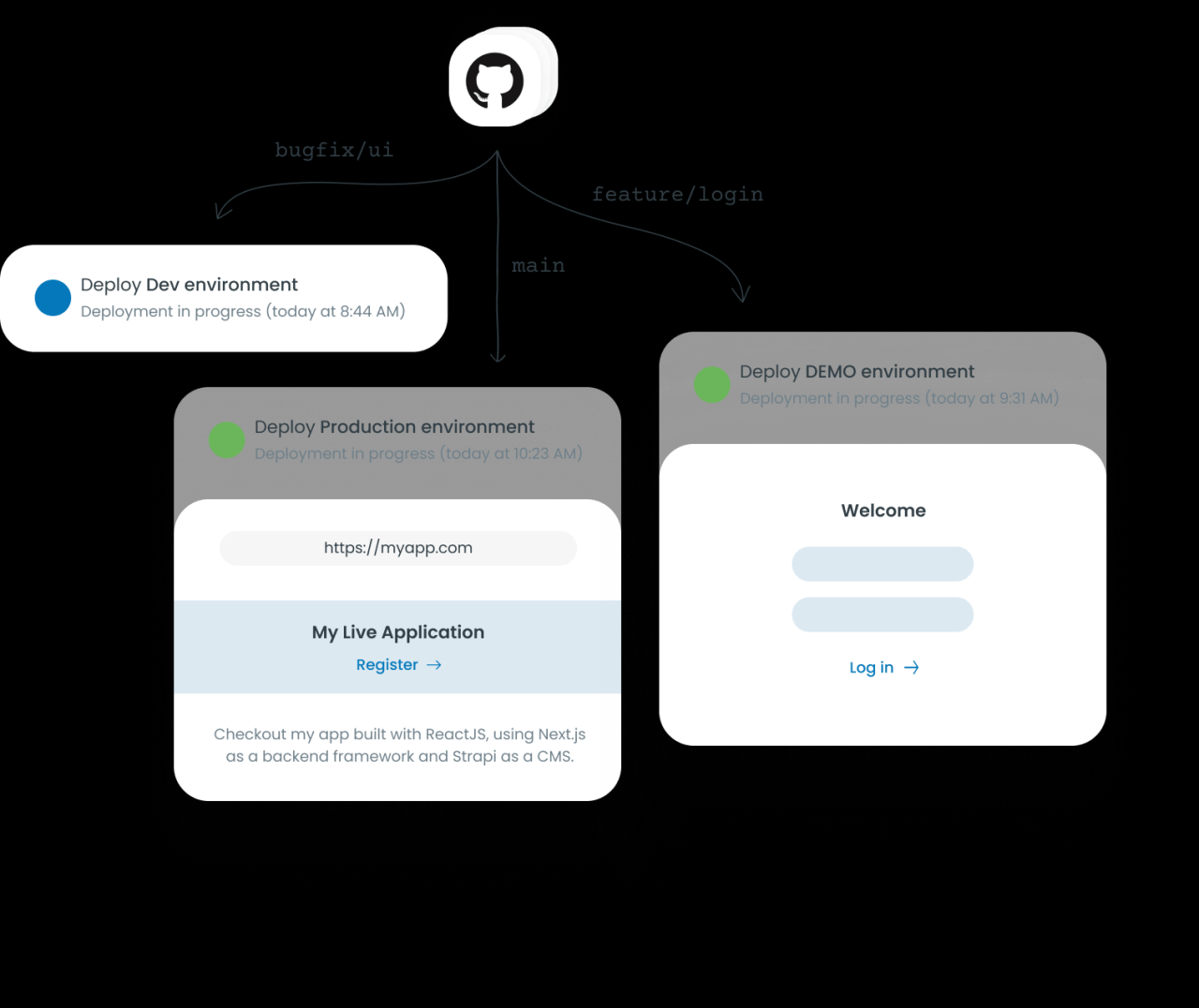
In today’s fast-paced software development environment, automation plays a crucial role in streamlining the deployment process. Leveraging automation tools not only improves deployment efficiency but also significantly reduces the potential for human error. By automating repetitive tasks, teams can focus more on innovation and problem-solving rather than manual execution, ultimately leading to faster delivery of high-quality software.
Automation enhances the deployment pipeline by minimizing the time it takes to move from development to production. This efficiency can be attributed to several key factors that contribute to a smoother deployment process. By reducing the manual steps involved, teams can quickly identify and address issues that may arise, leading to a more reliable deployment process.
Benefits of Automation in Deployment
Automating deployment processes provides various advantages that can greatly improve overall efficiency and output quality. The following points highlight the primary benefits of automation:
- Increased speed: Automation accelerates the deployment process, allowing for quicker release cycles. This is particularly important in agile environments where rapid iterations are essential.
- Reduced errors: By automating repetitive tasks, the likelihood of human error is significantly decreased. This leads to more consistent deployments and fewer rollbacks.
- Improved consistency: Automation ensures that the same steps are followed every time a deployment is executed. This consistency helps maintain the integrity of the application across environments.
- Enhanced collaboration: Automation tools often include features that facilitate collaboration among team members, improving communication and transparency throughout the deployment process.
- Scalability: Automated processes can easily scale as project requirements grow, allowing teams to manage larger deployments without a corresponding increase in manual effort.
Tools and Technologies for Automation
Various tools and technologies are available to facilitate automation in the deployment process. These tools help manage different aspects of deployment, from building code to monitoring applications post-deployment. Notable examples include:
- CI/CD tools: Continuous Integration and Continuous Deployment (CI/CD) tools such as Jenkins, GitLab CI, and CircleCI automate the process of integrating code changes and deploying applications, streamlining workflows.
- Configuration management tools: Tools like Ansible, Chef, and Puppet automate the configuration of servers and services, ensuring that environments are set up consistently and correctly.
- Container orchestration: Kubernetes and Docker Swarm automate the deployment, scaling, and management of containerized applications, providing flexibility and efficiency in managing applications.
- Monitoring and logging tools: Tools like Prometheus and ELK Stack help in automating the monitoring and logging of deployed applications, ensuring that any issues can be proactively addressed.
Potential Drawbacks of Automation
While automation offers numerous benefits, it also has potential drawbacks that need to be considered. Understanding these limitations helps teams navigate challenges effectively. Some key drawbacks include:
- Complexity: Automated systems can become complex and may require advanced knowledge to manage properly. Misconfigurations can lead to significant issues during deployment.
- Over-reliance on automation: Teams may become overly dependent on automation, leading to a lack of understanding of underlying processes. This can be problematic if manual intervention is required.
- Initial setup costs: The initial investment in time and resources to set up automated processes can be substantial, although it pays off in the long run.
- Maintenance: Automated systems require ongoing maintenance and updates to adapt to changing environments and technologies.
To mitigate these drawbacks, organizations can invest in proper training for their teams, regularly review and update automated processes, and maintain a balance between automated and manual interventions, ensuring that team members retain a solid understanding of deployment mechanisms.
Best practices for a successful deployment strategy
A successful deployment strategy is crucial for the smooth functioning and reliability of any software application. By adhering to best practices, organizations can minimize risks, reduce downtime, and ensure that the deployment process contributes positively to the overall product lifecycle. This section Artikels essential practices that can help streamline your deployment efforts.
Comprehensive checklist for deployment
Establishing a comprehensive checklist can help you track important tasks and ensure that nothing essential is overlooked during the deployment process. Here are key points to include in your checklist:
- Define deployment goals and objectives clearly.
- Ensure all stakeholders are informed and aligned on the deployment timeline.
- Prepare and review deployment documentation.
- Conduct environment readiness checks, including server configurations and network settings.
- Verify that all code changes have been reviewed and approved by relevant teams.
- Perform thorough backup procedures to secure existing data.
- Communicate the deployment schedule to all relevant parties.
- Establish a rollback plan in case of failure.
- Monitor the deployment process in real-time for any immediate issues.
Following this checklist can significantly enhance your deployment process.
Importance of testing and validation before deployment
Testing and validation are critical components of the deployment process. They help identify potential issues before the software goes live. Implementing efficient testing methods can save time and resources and enhance user satisfaction after deployment.
There are various methods to ensure thorough testing, including:
- Unit Testing: Validate individual components to ensure each part functions correctly.
- Integration Testing: Test the interaction between different modules for seamless functionality.
- System Testing: Assess the complete system’s compliance with specified requirements.
- User Acceptance Testing (UAT): Involve end-users to validate that the system meets their needs and expectations.
- Performance Testing: Evaluate the application’s performance under varying loads and conditions.
Adopting a comprehensive testing strategy can uncover issues early, reducing the risk of failures during or after deployment.
Case study: Successful application of deployment best practices
A notable case study highlighting effective deployment practices is that of a leading e-commerce platform that recently underwent a significant overhaul of its order processing system. The company implemented a structured deployment strategy that included all the aforementioned best practices.
Before deployment, the team developed a detailed checklist that Artikeld each step, from initial development to post-deployment monitoring. They conducted extensive testing phases, including unit, integration, and user acceptance testing, involving actual users in the feedback loop.
The deployment was scheduled during off-peak hours and included a detailed rollback plan. The team monitored the process in real-time and was prepared to revert to the previous system if any issues arose. After a successful deployment, they gathered user feedback to refine the system further.
This case illustrates how following best practices can lead to a successful deployment, minimizing downtime and enhancing user satisfaction while ensuring a secure and reliable system.
The impact of cloud computing on deployment strategies
Cloud computing has significantly reshaped the landscape of deployment strategies, moving from traditional methods to more agile and scalable solutions. This transformation enables organizations to enhance their operational efficiency and adapt swiftly to changing market conditions. With the ability to leverage cloud infrastructure, businesses can deploy applications faster, scale resources up or down as needed, and reduce overall costs associated with hardware and maintenance.
The shift to cloud computing has introduced innovative deployment methods, replacing on-premises infrastructure with cloud-based solutions. Companies can now implement continuous integration and continuous deployment (CI/CD) practices, which streamline the software release process. This allows for quicker updates, improved collaboration among teams, and the ability to respond rapidly to customer feedback.
Major cloud services facilitating deployment
Leading cloud providers offer a range of services designed to simplify and enhance deployment strategies. Understanding these offerings is crucial for organizations looking to optimize their deployment processes. Key services from major cloud providers include:
- Amazon Web Services (AWS): AWS offers services like Elastic Beanstalk for application deployment, Lambda for serverless computing, and CodeDeploy for automating code deployments.
- Microsoft Azure: Azure provides Azure DevOps for project management and CI/CD, Azure App Service for hosting web applications, and Azure Kubernetes Service for container orchestration.
- Google Cloud Platform (GCP): GCP features Cloud Run for deploying containerized applications, App Engine for web applications, and Cloud Build for CI/CD pipelines.
These services empower organizations to minimize time-to-market, lower operational costs, and enhance the reliability of their applications.
Successful business adaptations of cloud deployment
Numerous businesses have harnessed the power of cloud deployment strategies to drive operational improvements and foster innovation. For instance, Netflix transitioned to a cloud-based architecture to handle massive streaming demands, allowing for seamless scalability and improved content delivery. By leveraging AWS, Netflix can deploy updates frequently without interrupting service.
Another example is Airbnb, which uses cloud services to manage its extensive database of listings. By utilizing Amazon RDS (Relational Database Service), Airbnb can efficiently scale its database operations, ensuring fast response times and better user experience during peak traffic periods.
These examples illustrate the competitive edge gained through adopting cloud deployment strategies, showcasing how businesses can not only enhance their operations but also prepare for future growth in an ever-evolving digital landscape.
Monitoring and troubleshooting post-deployment
Effective monitoring and troubleshooting after deployment are crucial for ensuring that applications perform optimally and meet user expectations. By implementing robust monitoring strategies, teams can quickly identify issues and enhance user satisfaction. This phase is often overlooked but is vital for maintaining application reliability and performance over time.
Monitoring applications after deployment involves tracking various metrics that provide insights into application performance, user behavior, and potential issues. Key metrics include response time, error rates, server CPU usage, memory utilization, and user engagement levels. These metrics not only help in identifying anomalies in real time but also assist in forecasting future needs and scaling resources appropriately.
Metrics to Track
To ensure a comprehensive monitoring approach, several critical metrics should be consistently monitored. These metrics provide indicators of application health and user experience.
- Response Time: Measures the time taken for the application to respond to user requests. Slow response times can indicate performance issues.
- Error Rates: Tracks the frequency of errors encountered by users, which can highlight bugs or system overloads.
- CPU Usage: Monitors the processor load on your servers, helping to identify capacity issues or inefficiencies.
- Memory Utilization: Evaluates how much memory is being used by the application, which is essential for optimizing resource allocation.
- User Engagement: Analyzes user interactions within the application, providing insights into features that may need improvement or additional functionality.
Troubleshooting Common Post-Deployment Issues
Troubleshooting is an essential skill post-deployment, as issues can arise from various sources. Understanding common problems and their solutions can lead to prompt resolution, minimizing disruptions for users.
Common issues include performance bottlenecks, deployment errors, and user feedback indicating functionality flaws. Implementing a structured troubleshooting approach can assist in quickly diagnosing these problems.
“A systematic approach to diagnosing post-deployment issues is key to maintaining application performance and user satisfaction.”
1. Performance Bottlenecks: These often arise from insufficient resources or inefficient code. Monitoring tools can help pinpoint slow queries or high resource consumption areas.
– Solution: Optimize code, adjust server resources, or enhance database queries to improve performance.
2. Deployment Errors: Deployments can sometimes fail or introduce new bugs. This could be due to configuration issues or code conflicts.
– Solution: Review deployment logs to identify errors, roll back to a previous stable version, and ensure proper testing protocols are followed before redeployment.
3. User Feedback on Functionality: Users may report issues with new features or altered workflows post-deployment.
– Solution: Gather and categorize user feedback, prioritize issues based on impact, and address them in the next development cycle.
Monitoring and Troubleshooting Tools
Several tools are available to facilitate effective monitoring and troubleshooting post-deployment. These tools vary in functionality and purpose but are essential for maintaining application performance and reliability.
| Tool Name | Purpose | Key Features |
|---|---|---|
| New Relic | Application Performance Monitoring | Real-time performance insights, error tracking, and user interaction analytics. |
| Datadog | Infrastructure Monitoring | Comprehensive visibility into application metrics, logs, and traces. |
| Sentry | Error Tracking | Real-time error reporting, user impact analysis, and easy integration with multiple programming languages. |
| Prometheus | Metrics Monitoring | Powerful querying, alerting capabilities, and flexibility for custom metrics. |
| ELK Stack (Elasticsearch, Logstash, Kibana) | Log Management and Analysis | Centralized logging, real-time search capabilities, and interactive dashboarding. |
Future trends in deployment technology
As deployment technology continues to evolve, several emerging trends are reshaping how developers and businesses approach software delivery. The integration of new tools and methodologies aims to streamline processes, enhance efficiency, and ultimately improve the user experience. Understanding these trends will be crucial for stakeholders looking to stay competitive in an ever-changing marketplace.
Advancements in deployment technology are increasingly influenced by the rise of artificial intelligence (AI) and machine learning (ML). These technologies are not only automating routine tasks but also providing deep insights into performance metrics and user behavior. By leveraging AI and ML, developers can deploy applications faster and with a higher degree of accuracy, thereby reducing downtime and enhancing the quality of software products.
Automation and Continuous Deployment
The shift towards automation is one of the most significant trends in deployment technology. Continuous Deployment (CD) is gaining traction as organizations recognize the need for faster release cycles. Automation tools facilitate rapid testing and deployment, allowing teams to push updates multiple times a day without compromising quality. This trend has implications for both developers and businesses.
– Benefits of automation in deployment include:
– Faster Release Cycles: Automation reduces the time required for manual testing and deployment.
– Enhanced Quality Assurance: Automated testing tools help identify bugs early in the development process.
– Consistency Across Environments: Automated processes ensure uniformity, reducing discrepancies between production and testing environments.
Integration of AI and Machine Learning
AI and ML are playing pivotal roles in transforming deployment environments. These technologies analyze historical data to predict potential issues and automate corrective measures, thus enhancing operational efficiency.
– Key impacts of AI and ML on deployment technology:
– Predictive Analytics: AI tools can forecast deployment failures based on patterns in past data, enabling proactive measures.
– Enhanced Decision-Making: Machine learning algorithms analyze large datasets to provide actionable insights for deployment strategies.
– Smart Rollbacks: AI can automate rollback procedures in case of deployment failures, minimizing downtime.
Containerization and Microservices Architecture
Containerization is revolutionizing deployment strategies by enabling developers to package applications with their dependencies, leading to more consistent and reliable deployments. Coupled with microservices architecture, this approach allows for scalability and flexibility.
– Advantages of containerization include:
– Isolation: Containers operate independently, reducing conflicts between different application components.
– Portability: Applications can run seamlessly across various environments, from local development machines to cloud servers.
– Scalability: Microservices enable organizations to scale parts of their application independently based on demand.
“Containerization and microservices architecture are becoming standard practices, allowing businesses to deploy more efficiently and responsively.”
The future landscape of software deployment will likely be characterized by these advancements, making it imperative for developers and organizations to adapt swiftly. As the adoption of AI, automation, and containerization continues to rise, companies that leverage these technologies will position themselves for success in a competitive environment.
Closing Summary
In summary, effective deployment is essential for the success of any software project, requiring careful planning and execution. By understanding the various methods, leveraging automation, and adhering to best practices, developers can navigate the complexities of deployment with confidence. As technology continues to evolve, staying ahead of trends will further empower teams to optimize their deployment strategies and drive progress in the software landscape.
Frequently Asked Questions
What is deployment in software development?
Deployment refers to the process of delivering a software application to users after development and testing, ensuring it operates in a live environment.
Why is deployment important?
Deployment is crucial as it directly impacts user experience and satisfaction, determining whether the software meets its expected functionality in real-world use.
How can automation help in deployment?
Automation enhances deployment by reducing manual errors, speeding up the process, and allowing for consistent and repeatable deployment practices.
What is continuous deployment?
Continuous deployment is a method where code changes are automatically deployed to production after passing predefined testing phases, enabling rapid updates.
How do you monitor applications post-deployment?
Monitoring applications post-deployment involves tracking performance metrics, user interactions, and system health to quickly identify and address issues.
What are some common challenges faced during deployment?
Common challenges include managing version control, ensuring compatibility across environments, and resolving last-minute bugs that may arise.
How does cloud computing affect deployment?
Cloud computing offers scalable resources and services that simplify and enhance deployment processes, allowing for greater flexibility and efficiency.